mirror of
https://github.com/mrdbourke/pytorch-deep-learning.git
synced 2026-11-27 06:07:09 +00:00
update 05 annotations
This commit is contained in:
 Daniel Bourke committed
1 parent
7fe5d5d7bb
commit
cc9039ea3c
1 file changed
+686
-20
+686
-20
@@ -1,6 +1,6 @@
|
||||
# TODO: Going modular
|
||||
|
||||
In this section we're going to turn notebook 04 into a series of Python scripts saved to a directory called `going_modular`.
|
||||
In this section we're going to turn notebook 04 into a series of Python scripts saved to a directory called [`going_modular`](https://github.com/mrdbourke/pytorch-deep-learning/tree/main/going_modular).
|
||||
|
||||
This document will describe those steps.
|
||||
|
||||
@@ -56,6 +56,8 @@ I start ML projects in Jupyter/Google Colab notebooks for quick experimentation
|
||||
|
||||
Then when I've got something working, I move to Python scripts.
|
||||
|
||||
* TK image - workflow: notebooks/Google Colab -> Python Scripts
|
||||
|
||||
### PyTorch in the wild
|
||||
|
||||
In your travels, you'll see many code repositories for PyTorch-based ML projects have instructions on how to run the PyTorch code in the form of Python scripts.
|
||||
@@ -63,10 +65,11 @@ In your travels, you'll see many code repositories for PyTorch-based ML projects
|
||||
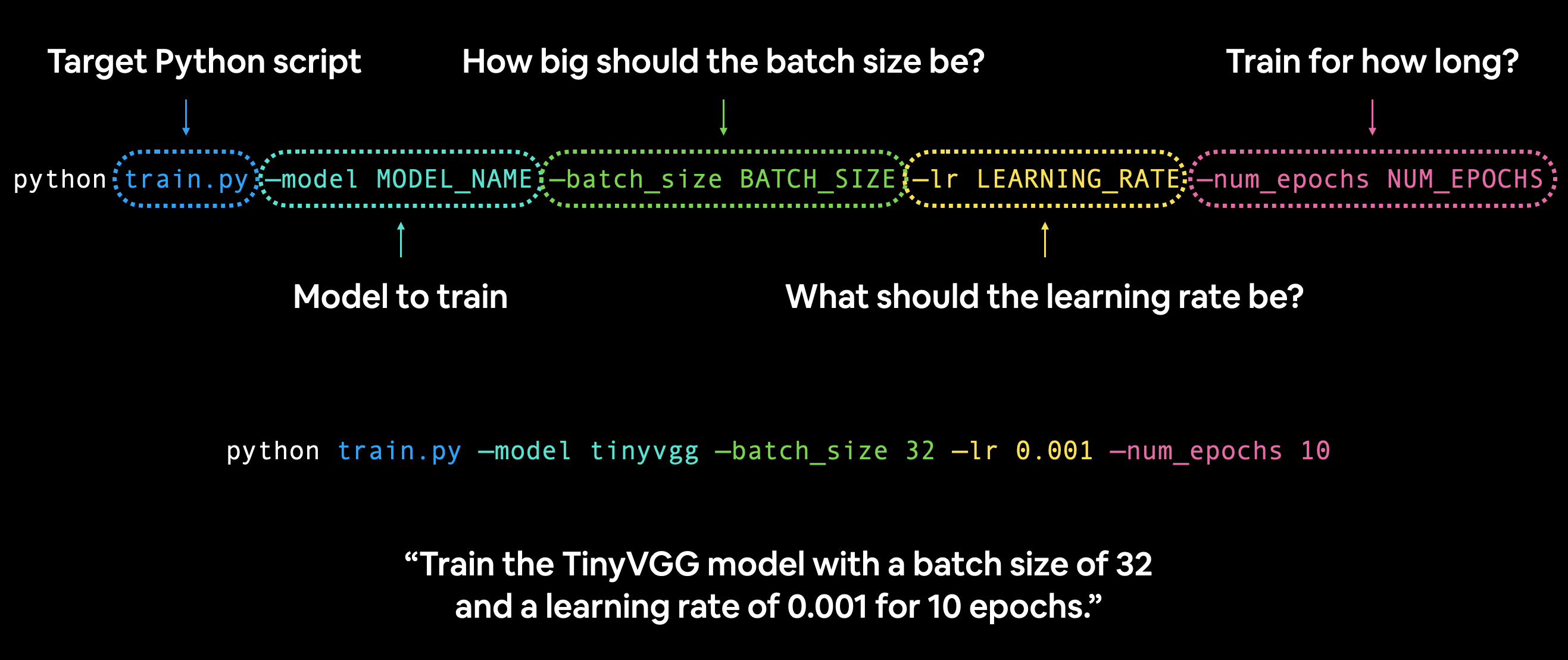
For example, you might be instructred to run code like the following in a terminal/command line to train a model:
|
||||
|
||||
```
|
||||
train.py --model MODEL_NAME --batch_size BATCH_SIZE --lr LEARNING_RATE --num_epochs NUM_EPOCHS
|
||||
python train.py --model MODEL_NAME --batch_size BATCH_SIZE --lr LEARNING_RATE --num_epochs NUM_EPOCHS
|
||||
```
|
||||
|
||||
TK image - annotate the above line
|
||||
|
||||
* TK - caption above/make smaller with <img> tag
|
||||
|
||||
In this case, `train.py` is the target Python script, it'll likely contain functions to train a PyTorch model.
|
||||
|
||||
@@ -77,7 +80,7 @@ You can set these to whatever values you like and if they're compatible with `tr
|
||||
For example, let's say we wanted to train our TinyVGG model for 10 epochs with a batch size of 32 and a learning rate of 0.001:
|
||||
|
||||
```
|
||||
train.py --model tinyvgg --batch_size 32 --lr 0.001 --num_epochs 32
|
||||
python train.py --model tinyvgg --batch_size 32 --lr 0.001 --num_epochs 10
|
||||
```
|
||||
|
||||
You could setup any number of these argument flags in your `train.py` script to suit your needs.
|
||||
@@ -88,14 +91,74 @@ TK image for PyTorch blog post training code - https://pytorch.org/blog/how-to-t
|
||||
|
||||
## TK - What we'ere going to cover
|
||||
|
||||
TODO
|
||||
* TK - part 1, part 2 notebooks
|
||||
* What are we going to end up with? What is the end file structure?
|
||||
The main concept of this section is: **Turn useful notebook code cells into reusable Python files.**
|
||||
|
||||
* Possible workflow: start in notebooks, explore and get something working, then go to Python scripts
|
||||
* Can use "%%writefile path/to/python/script.py" as jupyter cell magic to write a Python code file
|
||||
* What should be the environment used for teaching the refactoring section? Could everyone use VSCode or Jupyter Lab? Or VS Code?
|
||||
* TK - showcase how quickly notebook 04 can be reproduced when everything in a modular fashion (call the scripts on the command line).. e.g. `train_model.py...` -> saved model in target folder
|
||||
Doing this will save us in the future writing the save code over and over again.
|
||||
|
||||
There are two notebooks for this section:
|
||||
|
||||
More specifically, the two parts are:
|
||||
1. [**05. Going Modular: Part 1 (cell mode)**](https://github.com/mrdbourke/pytorch-deep-learning/blob/main/going_modular/05_pytorch_going_modular_cell_mode.ipynb) - this notebook is run as a traditional Jupyter Notebook/Google Colab notebook and is a condensed version of [notebook 04](https://www.learnpytorch.io/04_pytorch_custom_datasets/).
|
||||
2. [**05. Going Modular: Part 2 (script mode)**](https://github.com/mrdbourke/pytorch-deep-learning/blob/main/going_modular/05_pytorch_going_modular_script_mode.ipynb) - this notebook is the same as number 1 but with added functionality to turn each of the major sections into Python scripts, such as, `data_setup.py` and `train.py`.
|
||||
|
||||
### Why two parts?
|
||||
|
||||
Because sometimes the best way to learn something is to see how it *differs* from something else.
|
||||
|
||||
If you run each notebook side-by-side you'll see how they differ and that's where the key learnings are.
|
||||
|
||||
The text in this document focuses on 05. Going Modular: Part 2 (script mode).
|
||||
|
||||
### What we're working towards
|
||||
|
||||
By the end of this section we want to have two things:
|
||||
|
||||
1. The ability to train the model we built in notebook 04 (Food Vision Mini) with one line of code:
|
||||
|
||||
```
|
||||
python train.py
|
||||
```
|
||||
|
||||
2. A directory structure of reusable Python scripts, such as:
|
||||
|
||||
```
|
||||
going_modular/
|
||||
├── going_modular/
|
||||
│ ├── data_setup.py
|
||||
│ ├── engine.py
|
||||
│ ├── model_builder.py
|
||||
│ ├── train.py
|
||||
│ └── utils.py
|
||||
├── models/
|
||||
│ ├── 05_going_modular_cell_mode_tinyvgg_model.pth
|
||||
│ └── 05_going_modular_script_mode_tinyvgg_model.pth
|
||||
└── data/
|
||||
└── pizza_steak_sushi/
|
||||
├── train/
|
||||
│ ├── pizza/
|
||||
│ │ ├── image01.jpeg
|
||||
│ │ └── ...
|
||||
│ ├── steak/
|
||||
│ └── sushi/
|
||||
└── test/
|
||||
├── pizza/
|
||||
├── steak/
|
||||
└── sushi/
|
||||
```
|
||||
|
||||
### Things to note
|
||||
|
||||
* **Docstrings** - Writing reproducible and understandable code is important. And with this in mind, each of the functions/classes we'll be putting into scripts has been created with Google's [Python docstring style in mind](https://google.github.io/styleguide/pyguide.html#383-functions-and-methods).
|
||||
* **Imports at the top of scripts** - Since all of the Python scripts we're going to create could be considered a small program on their own, all of the scripts require their input modules be imported at the start of the script for example:
|
||||
|
||||
```python
|
||||
# Import modules required for train.py
|
||||
import os
|
||||
import torch
|
||||
import data_setup, engine, model_builder, utils
|
||||
|
||||
from torchvision import transforms
|
||||
```
|
||||
|
||||
## TK - Where can you get help?
|
||||
|
||||
@@ -105,24 +168,626 @@ If you run into trouble, you can ask a question on the course [GitHub Discussion
|
||||
|
||||
And of course, there's the [PyTorch documentation](https://pytorch.org/docs/stable/index.html) and [PyTorch developer forums](https://discuss.pytorch.org/), a very helpful place for all things PyTorch.
|
||||
|
||||
## TODO:
|
||||
* Go through each of the different sections and explain what's happening
|
||||
* How to go from functions in a notebook to `.py` (manaul vs automatic)
|
||||
* e.g. why use %%writefile vs just copy and paste?
|
||||
|
||||
## TK - 0. Cell mode vs. script mode
|
||||
|
||||
A cell mode notebook such as [05. Going Modular Part 1 (cell mode)](https://github.com/mrdbourke/pytorch-deep-learning/blob/main/going_modular/05_pytorch_going_modular_cell_mode.ipynb) is a notebook run normally, each cell in the notebook is either code or markdown.
|
||||
|
||||
A script mode notebook such as [05. Going Modular Part 2 (script mode)](https://github.com/mrdbourke/pytorch-deep-learning/blob/main/going_modular/05_pytorch_going_modular_script_mode.ipynb) is very similar to a cell mode notebook, however, many of the code cells may be turned into Python scripts.
|
||||
|
||||
> **Note:** You don't need to create Python scripts via a notebook, you can create them directly through an IDE (integrated developer environment) such as [VS Code](https://code.visualstudio.com/). Having the script mode notebook as part of this section is just to demonstrate one way of going from notebooks to Python scripts.
|
||||
|
||||
## TK - 1. Get data
|
||||
|
||||
## TK - 2. Create Datasets and DataLoaders
|
||||
Getting the data in each of the 05 notebooks happens the same as in [notebook 04](https://www.learnpytorch.io/04_pytorch_custom_datasets/#1-get-data).
|
||||
|
||||
## TK - 3. Setting up the training code (the engine)
|
||||
A call is made to GitHub via Python's `requests` module to download a `.zip` file and unzip it.
|
||||
|
||||
```python
|
||||
import os
|
||||
import requests
|
||||
import zipfile
|
||||
from pathlib import Path
|
||||
|
||||
# Setup path to data folder
|
||||
data_path = Path("data/")
|
||||
image_path = data_path / "pizza_steak_sushi"
|
||||
|
||||
# If the image folder doesn't exist, download it and prepare it...
|
||||
if image_path.is_dir():
|
||||
print(f"{image_path} directory exists.")
|
||||
else:
|
||||
print(f"Did not find {image_path} directory, creating one...")
|
||||
image_path.mkdir(parents=True, exist_ok=True)
|
||||
|
||||
# Download pizza, steak, sushi data
|
||||
with open(data_path / "pizza_steak_sushi.zip", "wb") as f:
|
||||
request = requests.get("https://github.com/mrdbourke/pytorch-deep-learning/raw/main/data/pizza_steak_sushi.zip")
|
||||
print("Downloading pizza, steak, sushi data...")
|
||||
f.write(request.content)
|
||||
|
||||
# Unzip pizza, steak, sushi data
|
||||
with zipfile.ZipFile(data_path / "pizza_steak_sushi.zip", "r") as zip_ref:
|
||||
print("Unzipping pizza, steak, sushi data...")
|
||||
zip_ref.extractall(image_path)
|
||||
|
||||
# Remove zip file
|
||||
os.remove(data_path / "pizza_steak_sushi.zip")
|
||||
```
|
||||
|
||||
This results in having a file called `data` that contains another directory called `pizza_steak_sushi` with images of pizza, steak and sushi in standard image classification format.
|
||||
|
||||
```
|
||||
data/
|
||||
└── pizza_steak_sushi/
|
||||
├── train/
|
||||
│ ├── pizza/
|
||||
│ │ ├── train_image01.jpeg
|
||||
│ │ ├── test_image02.jpeg
|
||||
│ │ └── ...
|
||||
│ ├── steak/
|
||||
│ │ └── ...
|
||||
│ └── sushi/
|
||||
│ └── ...
|
||||
└── test/
|
||||
├── pizza/
|
||||
│ ├── test_image01.jpeg
|
||||
│ └── test_image02.jpeg
|
||||
├── steak/
|
||||
└── sushi/
|
||||
```
|
||||
|
||||
## TK - 2. Create Datasets and DataLoaders (`data_setup.py`)
|
||||
|
||||
Once we've got data, we can then turn it into PyTorch `Dataset`'s and `DataLoader`'s (one for training data and one for testing data).
|
||||
|
||||
We convert the useful `Dataset` and `DataLoader` creation code into a function called `create_dataloaders()`.
|
||||
|
||||
And we write it to file using the line `%%writefile going_modular/data_setup.py`.
|
||||
|
||||
```python
|
||||
%%writefile going_modular/data_setup.py
|
||||
"""
|
||||
Contains functionality for creating PyTorch DataLoaders for
|
||||
image classification data.
|
||||
"""
|
||||
import os
|
||||
|
||||
from torchvision import datasets, transforms
|
||||
from torch.utils.data import DataLoader
|
||||
|
||||
NUM_WORKERS = os.cpu_count()
|
||||
|
||||
def create_dataloaders(
|
||||
train_dir: str,
|
||||
test_dir: str,
|
||||
transform: transforms.Compose,
|
||||
batch_size: int,
|
||||
num_workers: int=NUM_WORKERS
|
||||
):
|
||||
"""Creates training and testing DataLoaders.
|
||||
|
||||
Takes in a training directory and testing directory path and turns
|
||||
them into PyTorch Datasets and then into PyTorch DataLoaders.
|
||||
|
||||
Args:
|
||||
train_dir: Path to training directory.
|
||||
test_dir: Path to testing directory.
|
||||
transform: torchvision transforms to perform on training and testing data.
|
||||
batch_size: Number of samples per batch in each of the DataLoaders.
|
||||
num_workers: An integer for number of workers per DataLoader.
|
||||
|
||||
Returns:
|
||||
A tuple of (train_dataloader, test_dataloader, class_names).
|
||||
Where class_names is a list of the target classes.
|
||||
Example usage:
|
||||
train_dataloader, test_dataloader, class_names = \
|
||||
= create_dataloaders(train_dir=path/to/train_dir,
|
||||
test_dir=path/to/test_dir,
|
||||
transform=some_transform,
|
||||
batch_size=32,
|
||||
num_workers=4)
|
||||
"""
|
||||
# Use ImageFolder to create dataset(s)
|
||||
train_data = datasets.ImageFolder(train_dir, transform=transform)
|
||||
test_data = datasets.ImageFolder(test_dir, transform=transform)
|
||||
|
||||
# Get class names
|
||||
class_names = train_data.classes
|
||||
|
||||
# Turn images into data loaders
|
||||
train_dataloader = DataLoader(
|
||||
train_data,
|
||||
batch_size=batch_size,
|
||||
shuffle=True,
|
||||
num_workers=num_workers,
|
||||
pin_memory=True,
|
||||
)
|
||||
test_dataloader = DataLoader(
|
||||
test_data,
|
||||
batch_size=batch_size,
|
||||
shuffle=True,
|
||||
num_workers=num_workers,
|
||||
pin_memory=True,
|
||||
)
|
||||
|
||||
return train_dataloader, test_dataloader, class_names
|
||||
```
|
||||
|
||||
If we'd like to make `DataLoader`'s we can now use the function within `data_setup.py` like so:
|
||||
|
||||
```python
|
||||
from going_modular import data_setup
|
||||
|
||||
# Create train/test dataloader and get class names as a list
|
||||
train_dataloader, test_dataloader, class_names = data_setup.create_dataloaders(...)
|
||||
```
|
||||
|
||||
## TK - 3. Making a model (`model_builder.py`)
|
||||
|
||||
Over the past few notebooks, we've built the TinyVGG model a few times.
|
||||
|
||||
So it makes sense to put the model into its file so we can reuse it again and again.
|
||||
|
||||
Let's put our `TinyVGG()` model class into a script with the line `%%writefile going_modular/model_builder.py`:
|
||||
|
||||
```python
|
||||
%%writefile going_modular/model_builder.py
|
||||
"""
|
||||
Contains PyTorch model code to instantiate a TinyVGG model.
|
||||
"""
|
||||
import torch
|
||||
from torch import nn
|
||||
|
||||
class TinyVGG(nn.Module):
|
||||
"""Creates the TinyVGG architecture.
|
||||
|
||||
Replicates the TinyVGG architecture from the CNN explainer website in PyTorch.
|
||||
See the original architecture here: https://poloclub.github.io/cnn-explainer/
|
||||
|
||||
Args:
|
||||
input_shape: An integer indicating number of input channels.
|
||||
hidden_units: An integer indicating number of hidden units between layers.
|
||||
output_shape: An integer indicating number of output units.
|
||||
"""
|
||||
def __init__(self, input_shape: int, hidden_units: int, output_shape: int) -> None:
|
||||
super().__init__()
|
||||
self.conv_block_1 = nn.Sequential(
|
||||
nn.Conv2d(in_channels=input_shape,
|
||||
out_channels=hidden_units,
|
||||
kernel_size=3,
|
||||
stride=1,
|
||||
padding=0),
|
||||
nn.ReLU(),
|
||||
nn.Conv2d(in_channels=hidden_units,
|
||||
out_channels=hidden_units,
|
||||
kernel_size=3,
|
||||
stride=1,
|
||||
padding=0),
|
||||
nn.ReLU(),
|
||||
nn.MaxPool2d(kernel_size=2,
|
||||
stride=2)
|
||||
)
|
||||
self.conv_block_2 = nn.Sequential(
|
||||
nn.Conv2d(hidden_units, hidden_units, kernel_size=3, padding=0),
|
||||
nn.ReLU(),
|
||||
nn.Conv2d(hidden_units, hidden_units, kernel_size=3, padding=0),
|
||||
nn.ReLU(),
|
||||
nn.MaxPool2d(2)
|
||||
)
|
||||
self.classifier = nn.Sequential(
|
||||
nn.Flatten(),
|
||||
# Where did this in_features shape come from?
|
||||
# It's because each layer of our network compresses and changes the shape of our inputs data.
|
||||
nn.Linear(in_features=hidden_units*13*13,
|
||||
out_features=output_shape)
|
||||
)
|
||||
|
||||
def forward(self, x: torch.Tensor):
|
||||
x = self.conv_block_1(x)
|
||||
x = self.conv_block_2(x)
|
||||
x = self.classifier(x)
|
||||
return x
|
||||
# return self.classifier(self.block_2(self.block_1(x))) # <- leverage the benefits of operator fusion
|
||||
```
|
||||
|
||||
Now instead of coding the TinyVGG model from scratch every time, we can import it using:
|
||||
|
||||
```python
|
||||
import torch
|
||||
from going_modular import model_builder
|
||||
device = "cuda" if torch.cuda.is_available() else "cpu"
|
||||
|
||||
# Instantiate an instance of the model from the "model_builder.py" script
|
||||
torch.manual_seed(42)
|
||||
model = model_builder.TinyVGG(input_shape=3,
|
||||
hidden_units=10,
|
||||
output_shape=len(class_names)).to(device)
|
||||
```
|
||||
|
||||
## TK - 4. Creating `train_step()` and `test_step()` functions and `train()` to combine them
|
||||
|
||||
## TK - 5. Creating a function to save the model
|
||||
We wrote several training functions in [notebook 04](https://www.learnpytorch.io/04_pytorch_custom_datasets/#75-create-train-test-loop-functions):
|
||||
1. `train_step()` - takes in a model, a `DataLoader`, a loss function and an optimizer and trains the model on the `DataLoader`.
|
||||
2. `test_step()` - takes in a model, a `DataLoader` and a loss function and evaluates the model on the `DataLoader`.
|
||||
3. `train()` - performs 1. and 2. together for a given number of epochs and returns a results dictionary.
|
||||
|
||||
## TK - 6. Train, evaluate and save the model
|
||||
Since these will be the "engine" of our model training, we can put them all into a Python script called `engine.py` with the line `%%writefile going_modular/engine.py`:
|
||||
|
||||
```python
|
||||
%%writefile going_modular/engine.py
|
||||
"""
|
||||
Contains functions for training and testing a PyTorch model.
|
||||
"""
|
||||
import torch
|
||||
|
||||
from tqdm.auto import tqdm
|
||||
from typing import Dict, List, Tuple
|
||||
|
||||
def train_step(model: torch.nn.Module,
|
||||
dataloader: torch.utils.data.DataLoader,
|
||||
loss_fn: torch.nn.Module,
|
||||
optimizer: torch.optim.Optimizer,
|
||||
device: torch.device) -> Tuple[float, float]:
|
||||
"""Trains a PyTorch model for a single epoch.
|
||||
|
||||
Turns a target PyTorch model to training mode and then
|
||||
runs through all of the required training steps (forward
|
||||
pass, loss calculation, optimizer step).
|
||||
|
||||
Args:
|
||||
model: A PyTorch model to be trained.
|
||||
dataloader: A DataLoader instance for the model to be trained on.
|
||||
loss_fn: A PyTorch loss function to minimize.
|
||||
optimizer: A PyTorch optimizer to help minimize the loss function.
|
||||
device: A target device to compute on (e.g. "cuda" or "cpu").
|
||||
|
||||
Returns:
|
||||
A tuple of training loss and training accuracy metrics.
|
||||
In the form (train_loss, train_accuracy). For example:
|
||||
|
||||
(0.1112, 0.8743)
|
||||
"""
|
||||
# Put model in train mode
|
||||
model.train()
|
||||
|
||||
# Setup train loss and train accuracy values
|
||||
train_loss, train_acc = 0, 0
|
||||
|
||||
# Loop through data loader data batches
|
||||
for batch, (X, y) in enumerate(dataloader):
|
||||
# Send data to target device
|
||||
X, y = X.to(device), y.to(device)
|
||||
|
||||
# 1. Forward pass
|
||||
y_pred = model(X)
|
||||
|
||||
# 2. Calculate and accumulate loss
|
||||
loss = loss_fn(y_pred, y)
|
||||
train_loss += loss.item()
|
||||
|
||||
# 3. Optimizer zero grad
|
||||
optimizer.zero_grad()
|
||||
|
||||
# 4. Loss backward
|
||||
loss.backward()
|
||||
|
||||
# 5. Optimizer step
|
||||
optimizer.step()
|
||||
|
||||
# Calculate and accumulate accuracy metric across all batches
|
||||
y_pred_class = torch.argmax(torch.softmax(y_pred, dim=1), dim=1)
|
||||
train_acc += (y_pred_class == y).sum().item()/len(y_pred)
|
||||
|
||||
# Adjust metrics to get average loss and accuracy per batch
|
||||
train_loss = train_loss / len(dataloader)
|
||||
train_acc = train_acc / len(dataloader)
|
||||
return train_loss, train_acc
|
||||
|
||||
def test_step(model: torch.nn.Module,
|
||||
dataloader: torch.utils.data.DataLoader,
|
||||
loss_fn: torch.nn.Module,
|
||||
device: torch.device) -> Tuple[float, float]:
|
||||
"""Tests a PyTorch model for a single epoch.
|
||||
|
||||
Turns a target PyTorch model to "eval" mode and then performs
|
||||
a forward pass on a testing dataset.
|
||||
|
||||
Args:
|
||||
model: A PyTorch model to be tested.
|
||||
dataloader: A DataLoader instance for the model to be tested on.
|
||||
loss_fn: A PyTorch loss function to calculate loss on the test data.
|
||||
device: A target device to compute on (e.g. "cuda" or "cpu").
|
||||
|
||||
Returns:
|
||||
A tuple of testing loss and testing accuracy metrics.
|
||||
In the form (test_loss, test_accuracy). For example:
|
||||
|
||||
(0.0223, 0.8985)
|
||||
"""
|
||||
# Put model in eval mode
|
||||
model.eval()
|
||||
|
||||
# Setup test loss and test accuracy values
|
||||
test_loss, test_acc = 0, 0
|
||||
|
||||
# Turn on inference context manager
|
||||
with torch.inference_mode():
|
||||
# Loop through DataLoader batches
|
||||
for batch, (X, y) in enumerate(dataloader):
|
||||
# Send data to target device
|
||||
X, y = X.to(device), y.to(device)
|
||||
|
||||
# 1. Forward pass
|
||||
test_pred_logits = model(X)
|
||||
|
||||
# 2. Calculate and accumulate loss
|
||||
loss = loss_fn(test_pred_logits, y)
|
||||
test_loss += loss.item()
|
||||
|
||||
# Calculate and accumulate accuracy
|
||||
test_pred_labels = test_pred_logits.argmax(dim=1)
|
||||
test_acc += ((test_pred_labels == y).sum().item()/len(test_pred_labels))
|
||||
|
||||
# Adjust metrics to get average loss and accuracy per batch
|
||||
test_loss = test_loss / len(dataloader)
|
||||
test_acc = test_acc / len(dataloader)
|
||||
return test_loss, test_acc
|
||||
|
||||
def train(model: torch.nn.Module,
|
||||
train_dataloader: torch.utils.data.DataLoader,
|
||||
test_dataloader: torch.utils.data.DataLoader,
|
||||
optimizer: torch.optim.Optimizer,
|
||||
loss_fn: torch.nn.Module,
|
||||
epochs: int,
|
||||
device: torch.device) -> Dict[str, List]:
|
||||
"""Trains and tests a PyTorch model.
|
||||
|
||||
Passes a target PyTorch models through train_step() and test_step()
|
||||
functions for a number of epochs, training and testing the model
|
||||
in the same epoch loop.
|
||||
|
||||
Calculates, prints and stores evaluation metrics throughout.
|
||||
|
||||
Args:
|
||||
model: A PyTorch model to be trained and tested.
|
||||
train_dataloader: A DataLoader instance for the model to be trained on.
|
||||
test_dataloader: A DataLoader instance for the model to be tested on.
|
||||
optimizer: A PyTorch optimizer to help minimize the loss function.
|
||||
loss_fn: A PyTorch loss function to calculate loss on both datasets.
|
||||
epochs: An integer indicating how many epochs to train for.
|
||||
device: A target device to compute on (e.g. "cuda" or "cpu").
|
||||
|
||||
Returns:
|
||||
A dictionary of training and testing loss as well as training and
|
||||
testing accuracy metrics. Each metric has a value in a list for
|
||||
each epoch.
|
||||
In the form: {train_loss: [...],
|
||||
train_acc: [...],
|
||||
test_loss: [...],
|
||||
test_acc: [...]}
|
||||
For example if training for epochs=2:
|
||||
{train_loss: [2.0616, 1.0537],
|
||||
train_acc: [0.3945, 0.3945],
|
||||
test_loss: [1.2641, 1.5706],
|
||||
test_acc: [0.3400, 0.2973]}
|
||||
"""
|
||||
# Create empty results dictionary
|
||||
results = {"train_loss": [],
|
||||
"train_acc": [],
|
||||
"test_loss": [],
|
||||
"test_acc": []
|
||||
}
|
||||
|
||||
# Loop through training and testing steps for a number of epochs
|
||||
for epoch in tqdm(range(epochs)):
|
||||
train_loss, train_acc = train_step(model=model,
|
||||
dataloader=train_dataloader,
|
||||
loss_fn=loss_fn,
|
||||
optimizer=optimizer,
|
||||
device=device)
|
||||
test_loss, test_acc = test_step(model=model,
|
||||
dataloader=test_dataloader,
|
||||
loss_fn=loss_fn,
|
||||
device=device)
|
||||
|
||||
# Print out what's happening
|
||||
print(
|
||||
f"Epoch: {epoch+1} | "
|
||||
f"train_loss: {train_loss:.4f} | "
|
||||
f"train_acc: {train_acc:.4f} | "
|
||||
f"test_loss: {test_loss:.4f} | "
|
||||
f"test_acc: {test_acc:.4f}"
|
||||
)
|
||||
|
||||
# Update results dictionary
|
||||
results["train_loss"].append(train_loss)
|
||||
results["train_acc"].append(train_acc)
|
||||
results["test_loss"].append(test_loss)
|
||||
results["test_acc"].append(test_acc)
|
||||
|
||||
# Return the filled results at the end of the epochs
|
||||
return results
|
||||
```
|
||||
|
||||
Now we've got the `engine.py` script, we can import functions from it via:
|
||||
|
||||
```python
|
||||
from going_modular import engine
|
||||
|
||||
# Use train() by calling it from engine.py
|
||||
engine.train(...)
|
||||
```
|
||||
|
||||
## TK - 5. Creating a function to save the model (`utils.py`)
|
||||
|
||||
Often you'll want to save a model whilst it's training or after training.
|
||||
|
||||
Since we've written the code to save a model a few times now in previous notebooks, it makes sense to turn it into a function and save it to file.
|
||||
|
||||
It's common practice to store helper functions in a file called `utils.py` (short for utilities).
|
||||
|
||||
Let's save our `save_model()` function to a file called `utils.py` with the line `%%writefile going_modular/utils.py`:
|
||||
|
||||
```python
|
||||
%%writefile going_modular/utils.py
|
||||
"""
|
||||
Contains various utility functions for PyTorch model training and saving.
|
||||
"""
|
||||
import torch
|
||||
from pathlib import Path
|
||||
|
||||
def save_model(model: torch.nn.Module,
|
||||
target_dir: str,
|
||||
model_name: str):
|
||||
"""Saves a PyTorch model to a target directory.
|
||||
|
||||
Args:
|
||||
model: A target PyTorch model to save.
|
||||
target_dir: A directory for saving the model to.
|
||||
model_name: A filename for the saved model. Should include
|
||||
either ".pth" or ".pt" as the file extension.
|
||||
|
||||
Example usage:
|
||||
save_model(model=model_0,
|
||||
target_dir="models",
|
||||
model_name="05_going_modular_tingvgg_model.pth")
|
||||
"""
|
||||
# Create target directory
|
||||
target_dir_path = Path(target_dir)
|
||||
target_dir_path.mkdir(parents=True,
|
||||
exist_ok=True)
|
||||
|
||||
# Create model save path
|
||||
assert model_name.endswith(".pth") or model_name.endswith(".pt"), "model_name should end with '.pt' or '.pth'"
|
||||
model_save_path = target_dir_path / model_name
|
||||
|
||||
# Save the model state_dict()
|
||||
print(f"[INFO] Saving model to: {model_save_path}")
|
||||
torch.save(obj=model.state_dict(),
|
||||
f=model_save_path)
|
||||
```
|
||||
|
||||
Now if we wanted to use our `save_model()` function, instead of writing it all over again, we can import it and use it via:
|
||||
|
||||
```python
|
||||
from going_modular import utils
|
||||
|
||||
# Save a model to file
|
||||
save_model(model=...
|
||||
target_dir=...,
|
||||
model_name=...)
|
||||
```
|
||||
|
||||
## TK - 6. Train, evaluate and save the model (`train.py`)
|
||||
|
||||
As previously disccused you'll often come across PyTorch repositories that combine all of their functionality together in a `train.py` file.
|
||||
|
||||
This file is essentially saying "train the model using whatever data is available".
|
||||
|
||||
In this file, we combine all of the functionality of the other Python scripts we've created and use it to train a model.
|
||||
|
||||
This way we can train a PyTorch model using a single line of code on the command line:
|
||||
|
||||
```
|
||||
python train.py
|
||||
```
|
||||
|
||||
To create `train.py` we'll go through the following steps:
|
||||
1. Import the various dependencies, namely `torch`, `os`, `torchvision.transforms` and all of the scripts from the `going_modular` directory, `data_setup`, `engine`, `model_builder`, `utils`.
|
||||
* **Note:** Since `train.py` will be *inside* the `going_modular` directory, we can import the other modules via `import ...` rather than `from going_modular import ...`.
|
||||
2. Setup various hyperparameters such as batch size, number of epochs, learning rate and number of hidden units (these could be set in the future via [Python's `argparse`](https://docs.python.org/3/library/argparse.html)).
|
||||
3. Setup the training and test directories.
|
||||
4. Setup device-agnostic code.
|
||||
5. Create the necessary data transforms.
|
||||
6. Create the DataLoaders using `data_setup.py`.
|
||||
7. Create the model using `model_builder.py`.
|
||||
8. Setup the loss function and optimizer.
|
||||
9. Train the model using `engine.py`.
|
||||
10. Save the model using `utils.py`.
|
||||
|
||||
And we can create the file from a notebook cell using the line `%%writefile going_modular/train.py`:
|
||||
|
||||
```python
|
||||
%%writefile going_modular/train.py
|
||||
"""
|
||||
Trains a PyTorch image classification model using device-agnostic code.
|
||||
"""
|
||||
|
||||
import os
|
||||
import torch
|
||||
import data_setup, engine, model_builder, utils
|
||||
|
||||
from torchvision import transforms
|
||||
|
||||
# Setup hyperparameters
|
||||
NUM_EPOCHS = 5
|
||||
BATCH_SIZE = 32
|
||||
HIDDEN_UNITS = 10
|
||||
LEARNING_RATE = 0.001
|
||||
|
||||
# Setup directories
|
||||
train_dir = "data/pizza_steak_sushi/train"
|
||||
test_dir = "data/pizza_steak_sushi/test"
|
||||
|
||||
# Setup target device
|
||||
device = "cuda" if torch.cuda.is_available() else "cpu"
|
||||
|
||||
# Create transforms
|
||||
data_transform = transforms.Compose([
|
||||
transforms.Resize((64, 64)),
|
||||
transforms.ToTensor()
|
||||
])
|
||||
|
||||
# Create DataLoaders with help from data_setup.py
|
||||
train_dataloader, test_dataloader, class_names = data_setup.create_dataloaders(
|
||||
train_dir=train_dir,
|
||||
test_dir=test_dir,
|
||||
transform=data_transform,
|
||||
batch_size=BATCH_SIZE
|
||||
)
|
||||
|
||||
# Create model with help from model_builder.py
|
||||
model = model_builder.TinyVGG(
|
||||
input_shape=3,
|
||||
hidden_units=HIDDEN_UNITS,
|
||||
output_shape=len(class_names)
|
||||
).to(device)
|
||||
|
||||
# Set loss and optimizer
|
||||
loss_fn = torch.nn.CrossEntropyLoss()
|
||||
optimizer = torch.optim.Adam(model.parameters(),
|
||||
lr=LEARNING_RATE)
|
||||
|
||||
# Start training with help from engine.py
|
||||
engine.train(model=model,
|
||||
train_dataloader=train_dataloader,
|
||||
test_dataloader=test_dataloader,
|
||||
loss_fn=loss_fn,
|
||||
optimizer=optimizer,
|
||||
epochs=NUM_EPOCHS,
|
||||
device=device)
|
||||
|
||||
# Save the model with help from utils.py
|
||||
utils.save_model(model=model,
|
||||
target_dir="models",
|
||||
model_name="05_going_modular_script_mode_tinyvgg_model.pth")
|
||||
```
|
||||
|
||||
Woohoo!
|
||||
|
||||
Now we can train a PyTorch model by running the following line on the command line:
|
||||
|
||||
```
|
||||
python train.py
|
||||
```
|
||||
|
||||
Doing this will leverage all of the other code scripts we've created.
|
||||
|
||||
And if we wanted to we could adjust our `train.py` file to use argument flag inputs with Python's `argparse` module, this would allow us to provide different hyperparameter settings like previously discussed:
|
||||
|
||||
```
|
||||
python train.py --model MODEL_NAME --batch_size BATCH_SIZE --lr LEARNING_RATE --num_epochs NUM_EPOCHS
|
||||
```
|
||||
|
||||
## TK - Exercises
|
||||
* TK Add an argument for using a different:
|
||||
@@ -130,6 +795,7 @@ And of course, there's the [PyTorch documentation](https://pytorch.org/docs/stab
|
||||
* optimizer
|
||||
* etc...
|
||||
* Use `argparse` to be able to send `train.py` custom settings for training procedures
|
||||
* Create a script to predict on a target image given a file path with a saved model
|
||||
|
||||
## TK - Extra-curriculum
|
||||
* Read up on structuring a Python project on RealPython - https://realpython.com/python-application-layouts/
|
||||
|
||||
Reference in new issue
Block a user