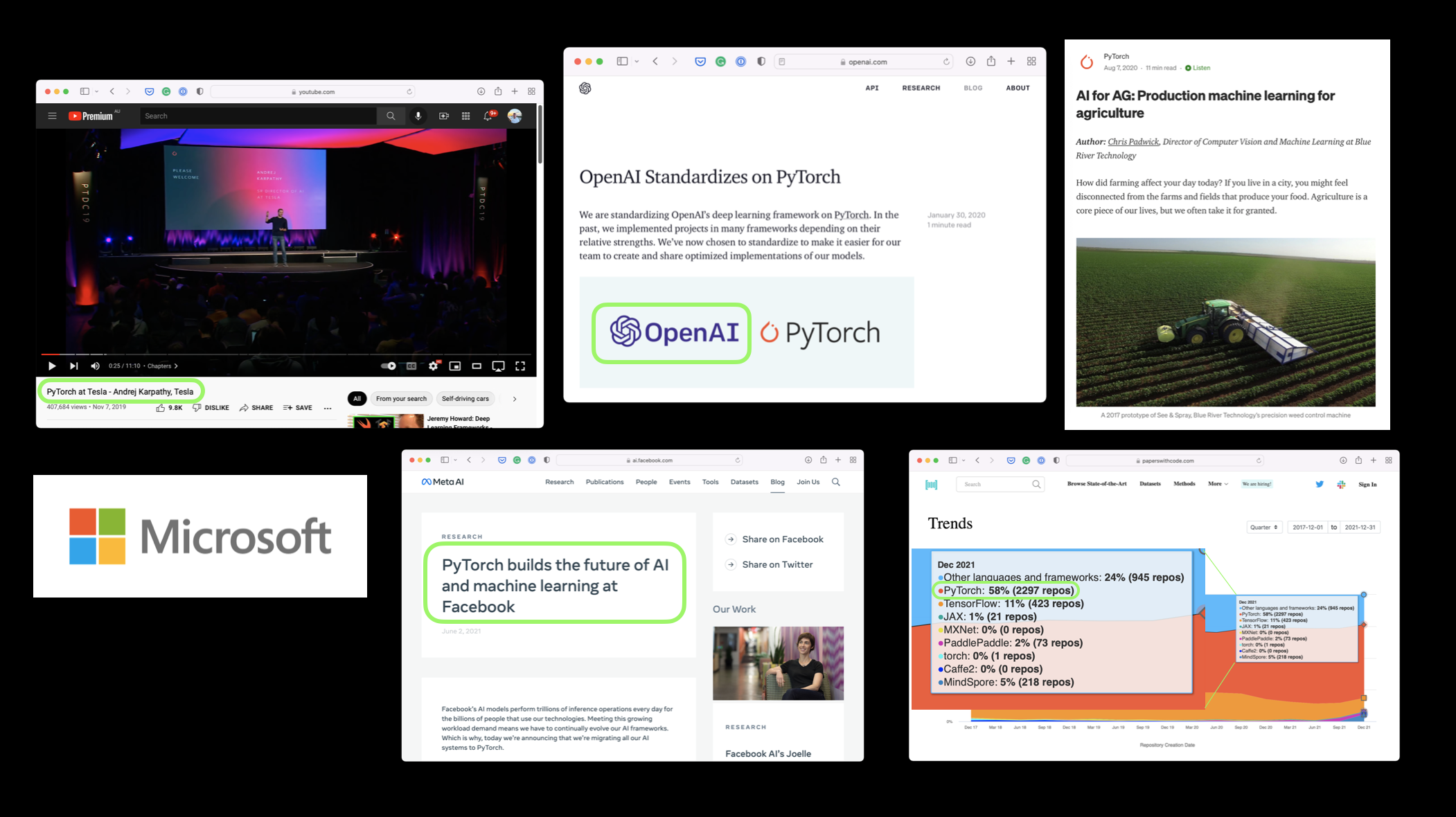
"Many of the world's largest technology companies such as [Meta (Facebook)](https://ai.facebook.com/blog/pytorch-builds-the-future-of-ai-and-machine-learning-at-facebook/), Tesla and Microsoft as well as artificial intelligence research companies such as [OpenAI use PyTorch](https://openai.com/blog/openai-pytorch/) to power research and bring machine learning to their products.\n",
"\n",
"For example, Andrej Karpathy (head of AI at Tesla) has given several talks ([PyTorch DevCon 2019](https://youtu.be/oBklltKXtDE), [Tesla AI Day 2021](https://youtu.be/j0z4FweCy4M?t=2904)) about how Tesla uses PyTorch to power their self-driving computer vision models.\n",
"PyTorch is also used in other industries such as agriculture to [power computer vision on tractors](https://medium.com/pytorch/ai-for-ag-production-machine-learning-for-agriculture-e8cfdb9849a1).\n",
"Machine learning researchers love using PyTorch. And as of February 2022, PyTorch is the [most used deep learning framework on Papers With Code](https://paperswithcode.com/trends), a website for tracking machine learning research papers and the code repositories attached with them.\n",
"\n",
"PyTorch also helps take care of many things such as GPU acceleration (making your code run faster) behind the scenes. \n",
"\n",
"So you can focus on manipulating data and writing algorithms and PyTorch will make sure it runs fast.\n",
"\n",
"And if companies such as Tesla and Meta (Facebook) use it to build models they deploy to power hundreds of applications, drive thousands of cars and deliver content to billions of people, it's clearly capable on the development front too.\n",
"\n",
"## What we're going to cover in this module\n",
"\n",
"This course is broken down into different sections (notebooks). \n",
"\n",
"Each notebook covers important ideas and concepts within PyTorch.\n",
"\n",
"Subsequent notebooks build upon knowledge from the previous one (numbering starts at 00, 01, 02 and goes to whatever it ends up going to).\n",
"\n",
"This notebook deals with the basic building block of machine learning and deep learning, the tensor.\n",
"\n",
"Specifically, we're going to cover:\n",
"\n",
"| **Topic** | **Contents** |\n",
"| ----- | ----- |\n",
"| **Introduction to tensors** | Tensors are the basic building block of all of machine learning and deep learning. |\n",
"| **Creating tensors** | Tensors can represent almost any kind of data (images, words, tables of numbers). |\n",
"| **Getting information from tensors** | If you can put information into a tensor, you'll want to get it out too. |\n",
"| **Manipulating tensors** | Machine learning algorithms (like neural networks) involve manipulating tensors in many different ways such as adding, multiplying, combining. | \n",
"| **Dealing with tensor shapes** | One of the most common issues in machine learning is dealing with shape mismatches (trying to mix wrong shaped tensors with other tensors). |\n",
"| **Indexing on tensors** | If you've indexed on a Python list or NumPy array, it's very similar with tensors, except they can have far more dimensions. |\n",
"| **Mixing PyTorch tensors and NumPy** | PyTorch plays with tensors ([`torch.Tensor`](https://pytorch.org/docs/stable/tensors.html)), NumPy likes arrays ([`np.ndarray`](https://numpy.org/doc/stable/reference/generated/numpy.ndarray.html)) sometimes you'll want to mix and match these. | \n",
"| **Reproducibility** | Machine learning is very experimental and since it uses a lot of *randomness* to work, sometimes you'll want that *randomness* to not be so random. |\n",
"| **Running tensors on GPU** | GPUs (Graphics Processing Units) make your code faster, PyTorch makes it easy to run your code on GPUs. |\n",
"All of the materials for this course [live on GitHub](https://github.com/mrdbourke/pytorch-deep-learning).\n",
"\n",
"And if you run into trouble, you can ask a question on the [Discussions page](https://github.com/mrdbourke/pytorch-deep-learning/discussions) there too.\n",
"\n",
"There's also the [PyTorch developer forums](https://discuss.pytorch.org/), a very helpful place for all things PyTorch. "
]
},
{
"cell_type": "markdown",
"metadata": {
"id": "5v3iRCRUTGeu"
},
"source": [
"## Importing PyTorch\n",
"\n",
"> **Note:** Before running any of the code in this notebook, you should have gone through the [PyTorch setup steps](https://pytorch.org/get-started/locally/). \n",
">\n",
"> However, **if you're running on Google Colab**, everything should work (Google Colab comes with PyTorch and other libraries installed).\n",
"\n",
"Let's start by importing PyTorch and checking the version we're using."
"This means if you're going through these materials, you'll see most compatability with PyTorch 1.10.0+, however if your version number is far higher than that, you might notice some inconsistencies. \n",
"\n",
"And if you do have any issues, please post on the course [GitHub Discussions page](https://github.com/mrdbourke/pytorch-deep-learning/discussions)."
"Now we've got PyTorch imported, it's time to learn about tensors.\n",
"\n",
"Tensors are the fundamental building block of machine learning.\n",
"\n",
"Their job is to represent data in a numerical way.\n",
"\n",
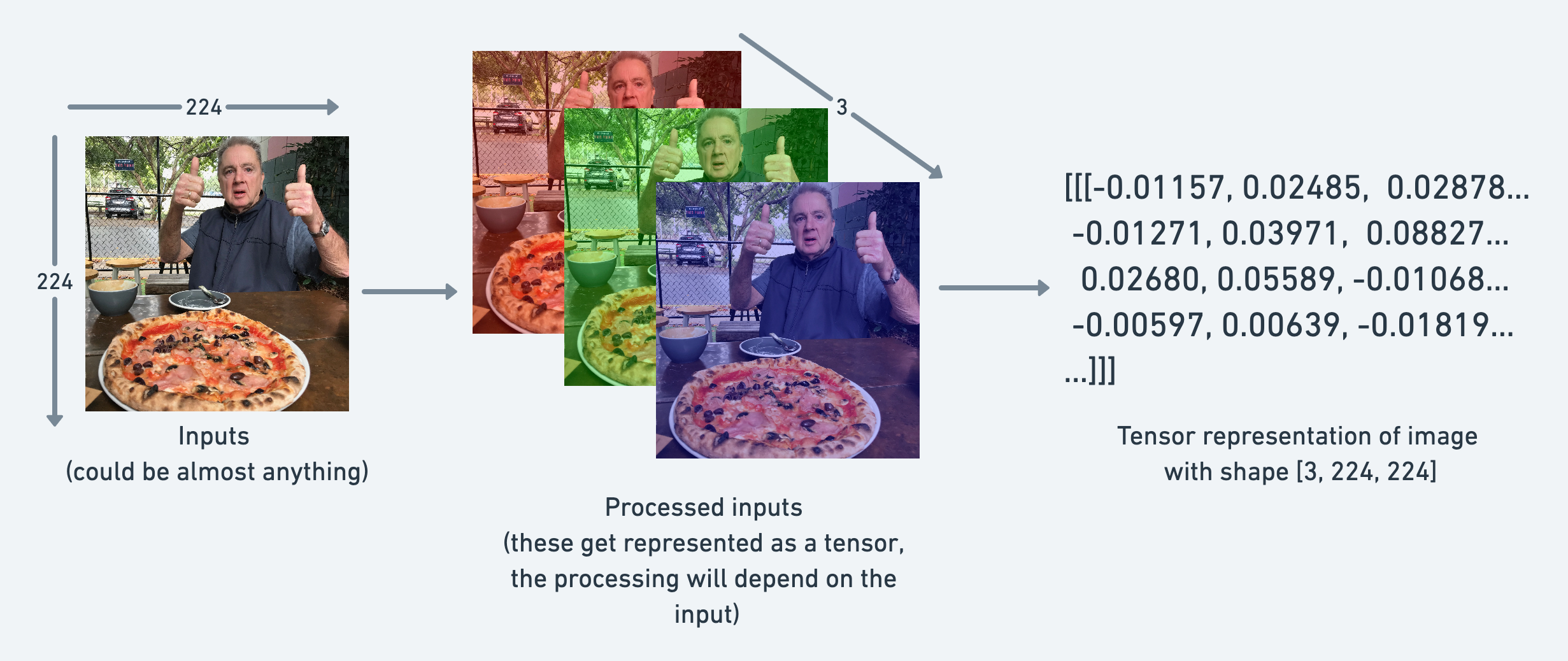
"For example, you could represent an image as a tensor with shape `[3, 224, 224]` which would mean `[colour_channels, height, width]`, as in the image has `3` colour channels (red, green, blue), a height of `224` pixels and a width of `224` pixels.\n",
"\n",
"\n",
"\n",
"In tensor-speak (the language used to describe tensors), the tensor would have three dimensions, one for `colour_channels`, `height` and `width`.\n",
"\n",
"But we're getting ahead of ourselves.\n",
"\n",
"Let's learn more about tensors by coding them.\n"
"PyTorch loves tensors. So much so there's a whole documentation page dedicated to the [`torch.Tensor`](https://pytorch.org/docs/stable/tensors.html) class.\n",
"Your first piece of homework is to [read through the documentation on `torch.Tensor`](https://pytorch.org/docs/stable/tensors.html) for 10-minutes. But you can get to that later.\n",
"> **Note:** That's a trend for this course. We'll focus on writing specific code. But often I'll set exercises which involve reading and getting familiar with the PyTorch documentation. Because after all, once you're finished this course, you'll no doubt want to learn more. And the documentation is somewhere you'll be finding yourself quite often."
"# Get the Python number within a tensor (only works with one-element tensors)\n",
"scalar.item()"
]
},
{
"cell_type": "markdown",
"metadata": {
"id": "qYs7ulrATGe0"
},
"source": [
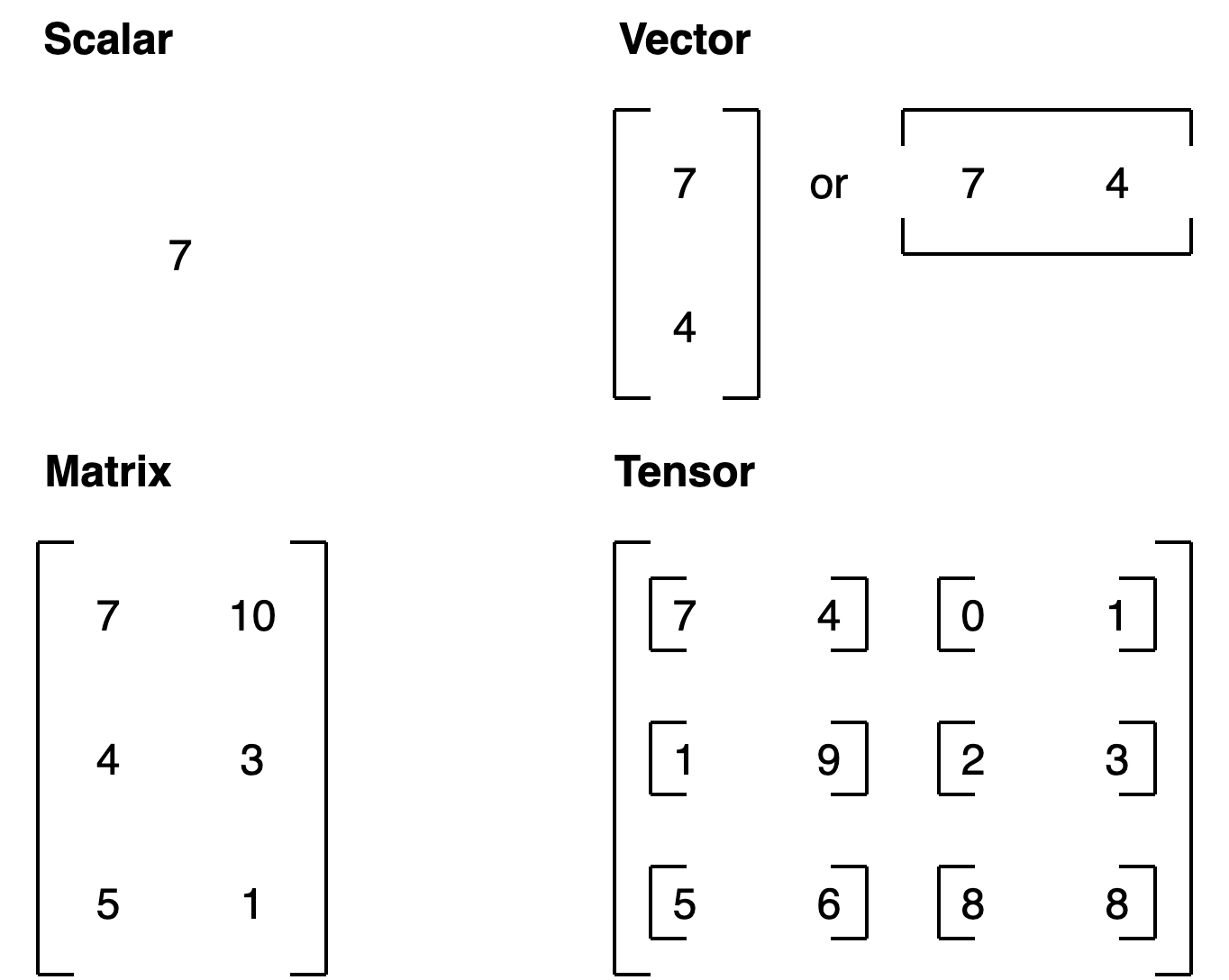
"Okay, now let's see a **vector**.\n",
"\n",
"A vector is a single dimension tensor but can contain many numbers.\n",
"\n",
"As in, you could have a vector `[3, 2]` to describe `[bedrooms, bathrooms]` in your house. Or you could have `[3, 2, 2]` to describe `[bedrooms, bathrooms, car_parks]` in your house.\n",
"\n",
"The important trend here is that a vector is flexible in what it can represent (the same with tensors)."
"Hmm, that's strange, `vector` contains two numbers but only has a single dimension.\n",
"\n",
"I'll let you in on a trick.\n",
"\n",
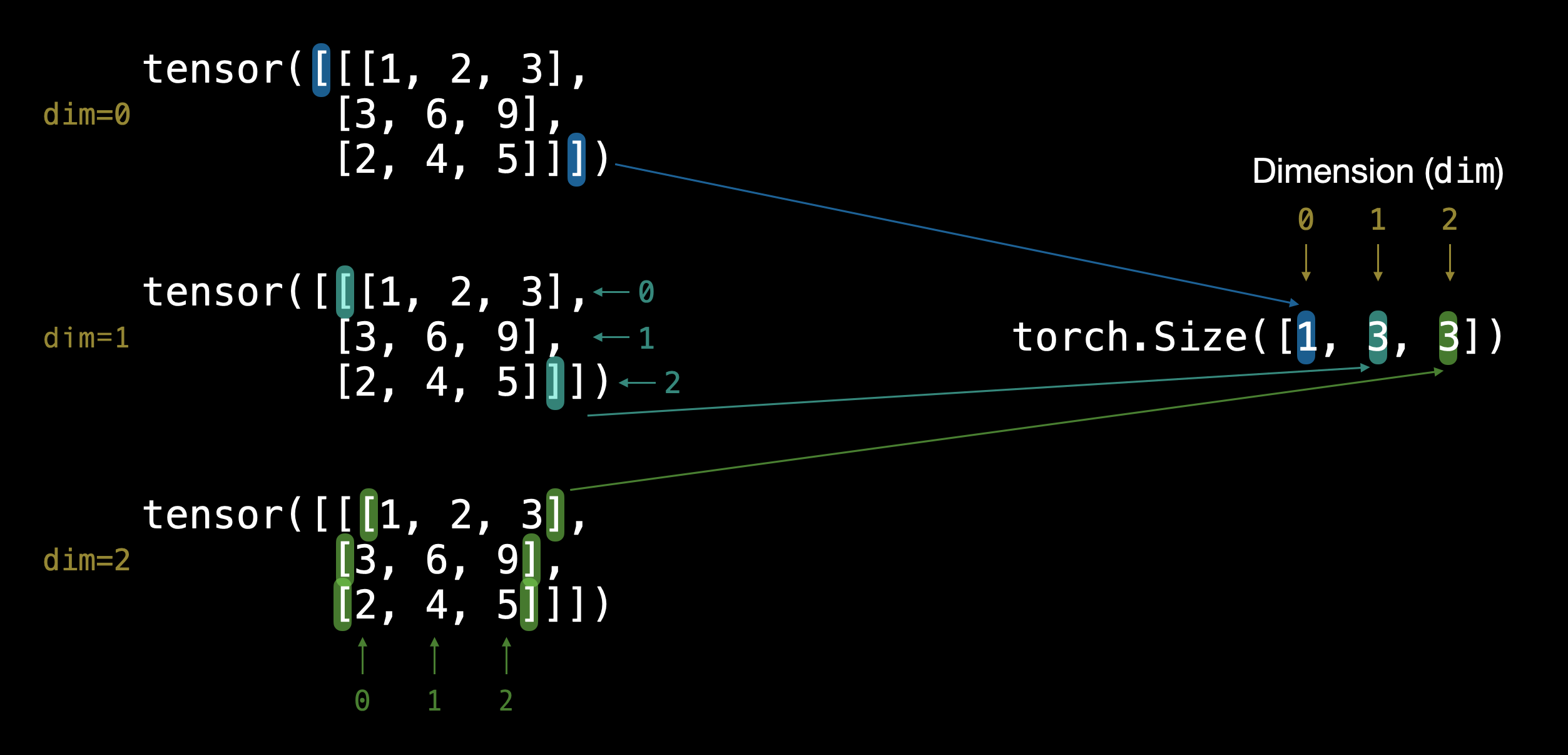
"You can tell the number of dimensions a tensor in PyTorch has by the number of square brackets on the outside (`[`) and you only need to count one side.\n",
"\n",
"How many square brackets does `vector` have?\n",
"\n",
"Another important concept for tensors is their `shape` attribute. The shape tells you how the elements inside them are arranged.\n",
"The above returns `torch.Size([2])` which means our vector has a shape of `[2]`. This is because of the two elements we placed inside the square brackets (`[7, 7]`).\n",
"I want to stress that tensors can represent almost anything. \n",
"\n",
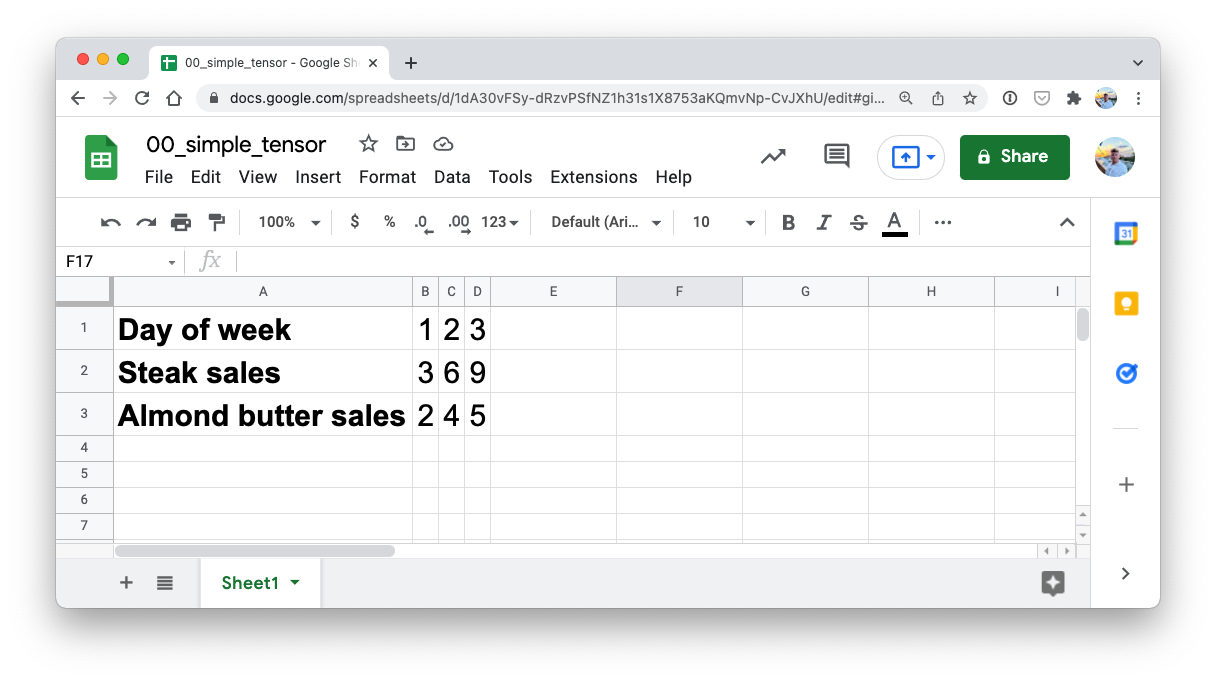
"The one we just created could be the sales numbers for a steak and almond butter store (two of my favourite foods).\n",
"\n",
"\n",
"\n",
"How many dimensions do you think it has? (hint: use the square bracket counting trick)"
"\n",
"\n",
"> **Note:** You might've noticed me using lowercase letters for `scalar` and `vector` and uppercase letters for `MATRIX` and `TENSOR`. This was on purpose. In practice, you'll often see scalars and vectors denoted as lowercase letters such as `y` or `a`. And matrices and tensors denoted as uppercase letters such as `X` or `W`.\n",
"> You also might notice the names martrix and tensor used interchangably. This is common. Since in PyTorch you're often dealing with `torch.Tensor`s (hence the tensor name), however, the shape and dimensions of what's inside will dictate what it actually is.\n",
"| Name | What is it? | Number of dimensions | Lower or upper (usually/example) |\n",
"| ----- | ----- | ----- | ----- |\n",
"| **scalar** | a single number | 0 | Lower (`a`) | \n",
"| **vector** | a number with direction (e.g. wind speed with direction) but can also have many other numbers | 1 | Lower (`y`) |\n",
"| **matrix** | a 2-dimensional array of numbers | 2 | Upper (`Q`) |\n",
"| **tensor** | an n-dimensional array of numbers | can be any number, a 0-dimension tensor is a scalar, a 1-dimension tensor is a vector | Upper (`X`) | \n",
"\n",
""
]
},
{
"cell_type": "markdown",
"metadata": {
"id": "dms7G4nkTGe5"
},
"source": [
"### Random tensors\n",
"\n",
"We've established tensors represent some form of data.\n",
"\n",
"And machine learning models such as neural networks manipulate and seek patterns within tensors.\n",
"Instead, a machine learning model often starts out with large random tensors of numbers and adjusts these random numbers as it works through data to better represent it.\n",
"\n",
"In essence:\n",
"\n",
"`Start with random numbers -> look at data -> update random numbers -> look at data -> update random numbers...`\n",
"\n",
"As a data scientist, you can define how the machine learning model starts (initialization), looks at data (representation) and updates (optimization) its random numbers.\n",
"\n",
"We'll get hands on with these steps later on.\n",
"\n",
"For now, let's see how to create a tensor of random numbers.\n",
"\n",
"We can do so using [`torch.rand()`](https://pytorch.org/docs/stable/generated/torch.rand.html) and passing in the `size` parameter."
"Sometimes you might want a range of numbers, such as 1 to 10 or 0 to 100.\n",
"\n",
"You can use `torch.arange(start, end, step)` to do so.\n",
"\n",
"Where:\n",
"* `start` = start of range (e.g. 0)\n",
"* `end` = end of range (e.g. 10)\n",
"* `step` = how many steps in between each value (e.g. 1)\n",
"\n",
"> **Note:** In Python, you can use `range()` to create a range. However in PyTorch, `torch.range()` is deprecated and may show an error in the future."
"/tmp/ipykernel_3695928/193451495.py:2: UserWarning: torch.range is deprecated and will be removed in a future release because its behavior is inconsistent with Python's range builtin. Instead, use torch.arange, which produces values in [start, end).\n",
"Sometimes you might want one tensor of a certain type with the same shape as another tensor.\n",
"\n",
"For example, a tensor of all zeros with the same shape as a previous tensor. \n",
"\n",
"To do so you can use [`torch.zeros_like(input)`](https://pytorch.org/docs/stable/generated/torch.zeros_like.html) or [`torch.ones_like(input)`](https://pytorch.org/docs/1.9.1/generated/torch.ones_like.html) which return a tensor filled with zeros or ones in the same shape as the `input` respectively."
"Generally if you see `torch.cuda` anywhere, the tensor is being used for GPU (since Nvidia GPUs use a computing toolkit called CUDA).\n",
"\n",
"The most common type (and generally the default) is `torch.float32` or `torch.float`.\n",
"\n",
"This is referred to as \"32-bit floating point\".\n",
"\n",
"But there's also 16-bit floating point (`torch.float16` or `torch.half`) and 64-bit floating point (`torch.float64` or `torch.double`).\n",
"\n",
"And to confuse things even more there's also 8-bit, 16-bit, 32-bit and 64-bit integers.\n",
"\n",
"Plus more!\n",
"\n",
"> **Note:** An integer is a flat round number like `7` whereas a float has a decimal `7.0`.\n",
"\n",
"The reason for all of these is to do with **precision in computing**.\n",
"\n",
"Precision is the amount of detail used to describe a number.\n",
"\n",
"The higher the precision value (8, 16, 32), the more detail and hence data used to express a number.\n",
"\n",
"This matters in deep learning and numerical computing because you're making so many operations, the more detail you have to calculate on, the more compute you have to use.\n",
"\n",
"So lower precision datatypes are generally faster to compute on but sacrifice some performance on evaluation metrics like accuracy (faster to compute but less accurate).\n",
"\n",
"> **Resources:** \n",
" * See the [PyTorch documentation for a list of all available tensor datatypes](https://pytorch.org/docs/stable/tensors.html#data-types).\n",
"Aside from shape issues (tensor shapes don't match up), two of the other most common issues you'll come across in PyTorch are datatype and device issues.\n",
"\n",
"For example, one of tensors is `torch.float32` and the other is `torch.float16` (PyTorch often likes tensors to be the same format).\n",
"\n",
"Or one of your tensors is on the CPU and the other is on the GPU (PyTorch likes calculations between tensors to be on the same device).\n",
"\n",
"We'll see more of this device talk later on.\n",
"\n",
"For now let's create a tensor with `dtype=torch.float16`."
"print(f\"Shape of tensor: {some_tensor.shape}\")\n",
"print(f\"Datatype of tensor: {some_tensor.dtype}\")\n",
"print(f\"Device tensor is stored on: {some_tensor.device}\") # will default to CPU"
]
},
{
"cell_type": "markdown",
"metadata": {
"id": "45K-E5uPg6cj"
},
"source": [
"> **Note:** When you run into issues in PyTorch, it's very often one to do with one of the three attributes above. So when the error messages show up, sing yourself a little song called \"what, what, where\": \n",
" * \"*what shape are my tensors? what datatype are they and where are they stored? what shape, what datatype, where where where*\""
]
},
{
"cell_type": "markdown",
"metadata": {
"id": "BdiWvoAi7UjL"
},
"source": [
"## Manipulating tensors (tensor operations)\n",
"\n",
"In deep learning, data (images, text, video, audio, protein structures, etc) gets represented as tensors.\n",
"\n",
"A model learns by investigating those tensors and performing a series of operations (could be 1,000,000s+) on tensors to create a representation of the patterns in the input data.\n",
"\n",
"These operations are often a wonderful dance between:\n",
"* Addition\n",
"* Substraction\n",
"* Multiplication (element-wise)\n",
"* Division\n",
"* Matrix multiplication\n",
"\n",
"And that's it. Sure there are a few more here and there but these are the basic building blocks of neural networks.\n",
"\n",
"Stacking these building blocks in the right way, you can create the most sophisticated of neural networks (just like lego!)."
]
},
{
"cell_type": "markdown",
"metadata": {
"id": "Sk_6Dd7L7Uce"
},
"source": [
"### Basic operations\n",
"\n",
"Let's start with a few of the fundamental operations, addition (`+`), subtraction (`-`), mutliplication (`*`).\n",
"Notice how the tensor values above didn't end up being `tensor([110, 120, 130])`, this is because the values inside the tensor don't change unless they're reassigned."
"PyTorch also has a bunch of built-in functions like [`torch.mul()`](https://pytorch.org/docs/stable/generated/torch.mul.html#torch.mul) (short for multiplication) and [`torch.add()`](https://pytorch.org/docs/stable/generated/torch.add.html) to perform basic operations. "
"# Element-wise multiplication (each element multiplies its equivalent, index 0->0, 1->1, 2->2)\n",
"print(tensor, \"*\", tensor)\n",
"print(\"Equals:\", tensor * tensor)"
]
},
{
"cell_type": "markdown",
"metadata": {
"id": "TT5fVuyu7q5z"
},
"source": [
"### Matrix multiplication (is all you need)\n",
"\n",
"One of the most common operations in machine learning and deep learning algorithms (like neural networks) is [matrix multiplication](https://www.mathsisfun.com/algebra/matrix-multiplying.html).\n",
"\n",
"PyTorch implements matrix multiplication functionality in the [`torch.matmul()`](https://pytorch.org/docs/stable/generated/torch.matmul.html) method.\n",
"\n",
"The main two rules for matrix multiplication to remember are:\n",
"2. The resulting matrix has the shape of the **outer dimensions**:\n",
" * `(2, 3) @ (3, 2)` -> `(2, 2)`\n",
" * `(3, 2) @ (2, 3)` -> `(3, 3)`\n",
"\n",
"> **Note:** \"`@`\" in Python is the symbol for matrix multiplication.\n",
"\n",
"> **Resource:** You can see all of the rules for matrix multiplication using `torch.matmul()` [in the PyTorch documentation](https://pytorch.org/docs/stable/generated/torch.matmul.html).\n",
"\n",
"Let's create a tensor and perform element-wise multiplication and matrix multiplication on it.\n",
"## One of the most common errors in deep learning (shape errors)\n",
"\n",
"Because much of deep learning is multiplying and performing operations on matrices and matrices have a strict rule about what shapes and sizes can be combined, one of the most common errors you'll run into in deep learning is shape mismatches."
"\n",
"\n",
"You can create your own matrix multiplication visuals like this at http://matrixmultiplication.xyz/.\n",
"\n",
"> **Note:** A matrix multiplication like this is also referred to as the [**dot product**](https://www.mathsisfun.com/algebra/vectors-dot-product.html) of two matrices.\n",
"\n"
]
},
{
"cell_type": "markdown",
"metadata": {
"id": "hA64Z4DmkB31"
},
"source": [
"Neural networks are full of matrix multiplications and dot products.\n",
"\n",
"The [`torch.nn.Linear()`](https://pytorch.org/docs/1.9.1/generated/torch.nn.Linear.html) module (we'll see this in action later on), also known as a feed-forward layer or fully connected layer, implements a matrix multiplication between an input `x` and a weights matrix `A`.\n",
"\n",
"$$\n",
"y = x\\cdot{A^T} + b\n",
"$$\n",
"\n",
"Where:\n",
"* `x` is the input to the layer (deep learning is a stack of layers like `torch.nn.Linear()` and others on top of each other).\n",
"* `A` is the weights matrix created by the layer, this starts out as random numbers that get adjusted as a neural network learns to better represent patterns in the data (notice the \"`T`\", that's because the weights matrix gets transposed).\n",
" * **Note:** You might also often see `W` or another letter like `X` used to showcase the weights matrix.\n",
"* `b` is the bias term used to slightly offset the weights and inputs.\n",
"* `y` is the output (a manipulation of the input in the hopes to discover patterns in it).\n",
"\n",
"This is a linear function (you may have seen something like $y = mx+b$ in high school or elsewhere), and can be used to draw a straight line!\n",
"\n",
"Let's play around with a linear layer.\n",
"\n",
"Try changing the values of `in_features` and `out_features` below and see what happens.\n",
"> **Question:** What happens if you change `in_features` from 2 to 3 above? Does it error? How could you change the shape of the input (`x`) to accommodate to the error? Hint: what did we have to do to `tensor_B` above?"
"If you've never done it before, matrix multiplication can be a confusing topic at first.\n",
"\n",
"But after you've played around with it a few times and even cracked open a few neural networks, you'll notice it's everywhere.\n",
"\n",
"Remember, matrix multiplication is all you need.\n",
"\n",
"\n",
"\n",
"*When you start digging into neural network layers and building your own, you'll find matrix multiplications everywhere. **Source:** https://marksaroufim.substack.com/p/working-class-deep-learner*"
]
},
{
"cell_type": "markdown",
"metadata": {
"id": "pjMmrJOOPv5e"
},
"source": [
"### Finding the min, max, mean, sum, etc (aggregation)\n",
"\n",
"Now we've seen a few ways to manipulate tensors, let's run through a few ways to aggregate them (go from more values to less values).\n",
"\n",
"First we'll create a tensor and then find the max, min, mean and sum of it.\n",
"# print(f\"Mean: {x.mean()}\") # this will error\n",
"print(f\"Mean: {x.type(torch.float32).mean()}\") # won't work without float datatype\n",
"print(f\"Sum: {x.sum()}\")"
]
},
{
"cell_type": "markdown",
"metadata": {
"id": "JHoKpsg3sKQE"
},
"source": [
"> **Note:** You may find some methods such as `torch.mean()` require tensors to be in `torch.float32` (the most common) or another specific datatype, otherwise the operation will fail. \n",
"\n",
"You can also do the same as above with `torch` methods."
"You can also find the index of a tensor where the max or minimum occurs with [`torch.argmax()`](https://pytorch.org/docs/stable/generated/torch.argmax.html) and [`torch.argmin()`](https://pytorch.org/docs/stable/generated/torch.argmin.html) respectively.\n",
"\n",
"This is helpful incase you just want the position where the highest (or lowest) value is and not the actual value itself (we'll see this in a later section when using the [softmax activation function](https://pytorch.org/docs/stable/generated/torch.nn.Softmax.html))."
"print(f\"Index where max value occurs: {tensor.argmax()}\")\n",
"print(f\"Index where min value occurs: {tensor.argmin()}\")"
]
},
{
"cell_type": "markdown",
"metadata": {
"id": "QBu33WihOXBk"
},
"source": [
"### Change tensor datatype\n",
"\n",
"As mentioned, a common issue with deep learning operations is having your tensors in different datatypes.\n",
"\n",
"If one tensor is in `torch.float64` and another is in `torch.float32`, you might run into some errors.\n",
"\n",
"But there's a fix.\n",
"\n",
"You can change the datatypes of tensors using [`torch.Tensor.type(dtype=None)`](https://pytorch.org/docs/stable/generated/torch.Tensor.type.html) where the `dtype` parameter is the datatype you'd like to use.\n",
"> **Note:** Different datatypes can be confusing to begin with. But think of it like this, the lower the number (e.g. 32, 16, 8), the less precise a computer stores the value. And with a lower amount of storage, this generally results in faster computation and a smaller overall model. Mobile-based neural networks often operate with 8-bit integers, smaller and faster to run but less accurate than their float32 counterparts. For more on this, I'd read up about [precision in computing](https://en.wikipedia.org/wiki/Precision_(computer_science)).\n",
"\n",
"> **Exercise:** So far we've covered a fair few tensor methods but there's a bunch more in the [`torch.Tensor` documentation](https://pytorch.org/docs/stable/tensors.html), I'd recommend spending 10-minutes scrolling through and looking into any that catch your eye. Click on them and then write them out in code yourself to see what happens."
]
},
{
"cell_type": "markdown",
"metadata": {
"id": "7CkCtAYmGsHY"
},
"source": [
"### Reshaping, stacking, squeezing and unsqueezing\n",
"\n",
"Often times you'll want to reshape or change the dimensions of your tensors without actually changing the values inside them.\n",
"\n",
"To do so, some popular methods are:\n",
"\n",
"| Method | One-line description |\n",
"| ----- | ----- |\n",
"| [`torch.reshape(input, shape)`](https://pytorch.org/docs/stable/generated/torch.reshape.html#torch.reshape) | Reshapes `input` to `shape` (if compatible), can also use `torch.Tensor.reshape()`. |\n",
"| [`Tensor.view(shape)`](https://pytorch.org/docs/stable/generated/torch.Tensor.view.html) | Returns a view of the original tensor in a different `shape` but shares the same data as the original tensor. |\n",
"| [`torch.stack(tensors, dim=0)`](https://pytorch.org/docs/1.9.1/generated/torch.stack.html) | Concatenates a sequence of `tensors` along a new dimension (`dim`), all `tensors` must be same size. |\n",
"| [`torch.squeeze(input)`](https://pytorch.org/docs/stable/generated/torch.squeeze.html) | Squeezes `input` to remove all the dimenions with value `1`. |\n",
"| [`torch.unsqueeze(input, dim)`](https://pytorch.org/docs/1.9.1/generated/torch.unsqueeze.html) | Returns `input` with a dimension value of `1` added at `dim`. | \n",
"| [`torch.permute(input, dims)`](https://pytorch.org/docs/stable/generated/torch.permute.html) | Returns a *view* of the original `input` with its dimensions permuted (rearranged) to `dims`. | \n",
"Because deep learning models (neural networks) are all about manipulating tensors in some way. And because of the rules of matrix multiplication, if you've got shape mismatches, you'll run into errors. These methods help you make sure the right elements of your tensors are mixing with the right elements of other tensors. \n",
"> **Note**: Because permuting returns a *view* (shares the same data as the original), the values in the permuted tensor will be the same as the original tensor and if you change the values in the view, it will change the values of the original."
]
},
{
"cell_type": "markdown",
"metadata": {
"id": "nEPqVL7fTGfC"
},
"source": [
"## Indexing (selecting data from tensors)\n",
"\n",
"Sometimes you'll want to select specific data from tensors (for example, only the first column or second row).\n",
"\n",
"To do so, you can use indexing.\n",
"\n",
"If you've ever done indexing on Python lists or NumPy arrays, indexing in PyTorch with tensors is very similar."
"# Get index 0 of 0th and 1st dimension and all values of 2nd dimension \n",
"x[0, 0, :] # same as x[0][0]"
]
},
{
"cell_type": "markdown",
"metadata": {
"id": "6Ik0r11RIxtm"
},
"source": [
"Indexing can be quite confusing to begin with, especially with larger tensors (I still have to try indexing multiple times to get it right). But with a bit of practice and following the data explorer's motto (***visualize, visualize, visualize***), you'll start to get the hang of it."
]
},
{
"cell_type": "markdown",
"metadata": {
"id": "h8ZaW0Bq7rCm"
},
"source": [
"## PyTorch tensors & NumPy\n",
"\n",
"Since NumPy is a popular Python numerical computing library, PyTorch has functionality to interact with it nicely. \n",
"\n",
"The two main methods you'll want to use for NumPy to PyTorch (and back again) are: \n",
"> **Note:** By default, NumPy arrays are created with the datatype `float64` and if you convert it to a PyTorch tensor, it'll keep the same datatype (as above). \n",
">\n",
"> However, many PyTorch calculations default to using `float32`. \n",
"> \n",
"> So if you want to convert your NumPy array (float64) -> PyTorch tensor (float64) -> PyTorch tensor (float32), you can use `tensor = torch.from_numpy(array).type(torch.float32)`.\n",
"\n",
"Because we reassigned `tensor` above, if you change the tensor, the array stays the same."
"## Reproducibility (trying to take the random out of random)\n",
"\n",
"As you learn more about neural networks and machine learning, you'll start to discover how much randomness plays a part.\n",
"\n",
"Well, pseudorandomness that is. Because after all, as they're designed, a computer is fundamentally deterministic (each step is predictable) so the randomness they create are simulated randomness (though there is debate on this too, but since I'm not a computer scientist, I'll let you find out more yourself).\n",
"\n",
"How does this relate to neural networks and deep learning then?\n",
"\n",
"We've discussed neural networks start with random numbers to describe patterns in data (these numbers are poor descriptions) and try to improve those random numbers using tensor operations (and a few other things we haven't discussed yet) to better describe patterns in data.\n",
"\n",
"In short: \n",
"\n",
"``start with random numbers -> tensor operations -> try to make better (again and again and again)``\n",
"\n",
"Although randomness is nice and powerful, sometimes you'd like there to be a little less randomness.\n",
"\n",
"Why?\n",
"\n",
"So you can perform repeatable experiments.\n",
"\n",
"For example, you create an algorithm capable of achieving X performance.\n",
"\n",
"And then your friend tries it out to verify you're not crazy.\n",
"\n",
"How could they do such a thing?\n",
"\n",
"That's where **reproducibility** comes in.\n",
"\n",
"In other words, can you get the same (or very similar) results on your computer running the same code as I get on mine?\n",
"\n",
"Let's see a brief example of reproducibility in PyTorch.\n",
"\n",
"We'll start by creating two random tensors, since they're random, you'd expect them to be different right? "
"As in, the tensors would still contain random values but they would be of the same flavour.\n",
"\n",
"That's where [`torch.manual_seed(seed)`](https://pytorch.org/docs/stable/generated/torch.manual_seed.html) comes in, where `seed` is an integer (like `42` but it could be anything) that flavours the randomness.\n",
"\n",
"Let's try it out by creating some more *flavoured* random tensors."
"> **Resource:** What we've just covered only scratches the surface of reproducibility in PyTorch. For more, on reproducibility in general and random seeds, I'd checkout:\n",
"> * [The PyTorch reproducibility documentation](https://pytorch.org/docs/stable/notes/randomness.html) (a good exercise would be to read through this for 10-minutes and even if you don't understand it now, being aware of it is important).\n",
"> * [The Wikipedia random seed page](https://en.wikipedia.org/wiki/Random_seed) (this'll give a good overview of random seeds and pseudorandomness in general)."
]
},
{
"cell_type": "markdown",
"metadata": {
"id": "hxIIM7t27rQ-"
},
"source": [
"## Running tensors on GPUs (and making faster computations)\n",
"\n",
"Deep learning algorithms require a lot of numerical operations.\n",
"\n",
"And by default these operations are often done on a CPU (computer processing unit).\n",
"\n",
"However, there's another common piece of hardware called a GPU (graphics processing unit), which is often much faster at performing the specific types of operations neural networks need (matrix multiplications) than CPUs.\n",
"\n",
"Your computer might have one.\n",
"\n",
"If so, you should look to use it whenever you can to train neural networks because chances are it'll speed up the training time dramatically.\n",
"\n",
"There are a few ways to first get access to a GPU and secondly get PyTorch to use the GPU.\n",
"\n",
"> **Note:** When I reference \"GPU\" throughout this course, I'm referencing a [Nvidia GPU with CUDA](https://developer.nvidia.com/cuda-gpus) enabled (CUDA is a computing platform and API that helps allow GPUs be used for general purpose computing & not just graphics) unless otherwise specified.\n",
"\n"
]
},
{
"cell_type": "markdown",
"metadata": {
"id": "0UiR6QpoYQH_"
},
"source": [
"\n",
"### 1. Getting a GPU\n",
"\n",
"You may already know what's going on when I say GPU. But if not, there are a few ways to get access to one.\n",
"\n",
"| **Method** | **Difficulty to setup** | **Pros** | **Cons** | **How to setup** |\n",
"| ----- | ----- | ----- | ----- | ----- |\n",
"| Google Colab | Easy | Free to use, almost zero setup required, can share work with others as easy as a link | Doesn't save your data outputs, limited compute, subject to timeouts | [Follow the Google Colab Guide](https://colab.research.google.com/notebooks/gpu.ipynb) |\n",
"| Use your own | Medium | Run everything locally on your own machine | GPUs aren't free, require upfront cost | Follow the [PyTorch installation guidelines](https://pytorch.org/get-started/locally/) |\n",
"| Cloud computing (AWS, GCP, Azure) | Medium-Hard | Small upfront cost, access to almost infinite compute | Can get expensive if running continually, takes some time to setup right | Follow the [PyTorch installation guidelines](https://pytorch.org/get-started/cloud-partners/) |\n",
"There are more options for using GPUs but the above three will suffice for now.\n",
"\n",
"Personally, I use a combination of Google Colab and my own personal computer for small scale experiments (and creating this course) and go to cloud resources when I need more compute power.\n",
"\n",
"> **Resource:** If you're looking to purchase a GPU of your own but not sure what to get, [Tim Dettmers has an excellent guide](https://timdettmers.com/2020/09/07/which-gpu-for-deep-learning/).\n",
"\n",
"To check if you've got access to a Nvidia GPU, you can run `!nvidia-smi` where the `!` (also called bang) means \"run this on the command line\".\n",
"Once you've got a GPU ready to access, the next step is getting PyTorch to use for storing data (tensors) and computing on data (performing operations on tensors).\n",
"\n",
"To do so, you can use the [`torch.cuda`](https://pytorch.org/docs/stable/cuda.html) package.\n",
"\n",
"Rather than talk about it, let's try it out.\n",
"\n",
"You can test if PyTorch has access to a GPU using [`torch.cuda.is_available()`](https://pytorch.org/docs/stable/generated/torch.cuda.is_available.html#torch.cuda.is_available).\n"
"If the above outputs `True`, PyTorch can see and use the GPU, if it outputs `False`, it can't see the GPU and in that case, you'll have to go back through the installation steps.\n",
"\n",
"Now, let's say you wanted to setup your code so it ran on CPU *or* the GPU if it was available.\n",
"\n",
"That way, if you or someone decides to run your code, it'll work regardless of the computing device they're using. \n",
"\n",
"Let's create a `device` variable to store what kind of device is available."
"device = \"cuda\" if torch.cuda.is_available() else \"cpu\"\n",
"device"
]
},
{
"cell_type": "markdown",
"metadata": {
"id": "FjFyPP2WaCch"
},
"source": [
"If the above output `\"cuda\"` it means we can set all of our PyTorch code to use the available CUDA device (a GPU) and if it output `\"cpu\"`, our PyTorch code will stick with the CPU.\n",
"\n",
"> **Note:** In PyTorch, it's best practice to write [**device agnostic code**](https://pytorch.org/docs/master/notes/cuda.html#device-agnostic-code). This means code that'll run on CPU (always available) or GPU (if available).\n",
"\n",
"If you want to do faster computing you can use a GPU but if you want to do *much* faster computing, you can use multiple GPUs.\n",
"\n",
"You can count the number of GPUs PyTorch has access to using [`torch.cuda.device_count()`](https://pytorch.org/docs/stable/generated/torch.cuda.device_count.html#torch.cuda.device_count)."
"Knowing the number of GPUs PyTorch has access to is helpful incase you wanted to run a specific process on one GPU and another process on another (PyTorch also has features to let you run a process across *all* GPUs)."
"### 3. Putting tensors (and models) on the GPU\n",
"\n",
"You can put tensors (and models, we'll see this later) on a specific device by calling [`to(device)`](https://pytorch.org/docs/stable/generated/torch.Tensor.to.html) on them. Where `device` is the target device you'd like the tensor (or model) to go to.\n",
"\n",
"Why do this?\n",
"\n",
"GPUs offer far faster numerical computing than CPUs do and if a GPU isn't available, because of our **device agnostic code** (see above), it'll run on the CPU.\n",
"\n",
"> **Note:** Putting a tensor on GPU using `to(device)` (e.g. `some_tensor.to(device)`) returns a copy of that tensor, e.g. the same tensor will be on CPU and GPU. To overwrite tensors, reassign them:\n",
">\n",
"> `some_tensor = some_tensor.to(device)`\n",
"\n",
"Let's try creating a tensor and putting it on the GPU (if it's available)."
"If you have a GPU available, the above code will output something like:\n",
"\n",
"```\n",
"tensor([1, 2, 3]) cpu\n",
"tensor([1, 2, 3], device='cuda:0')\n",
"```\n",
"\n",
"Notice the second tensor has `device='cuda:0'`, this means it's stored on the 0th GPU available (GPUs are 0 indexed, if two GPUs were available, they'd be `'cuda:0'` and `'cuda:1'` respectively, up to `'cuda:n'`).\n",
"\n"
]
},
{
"cell_type": "markdown",
"metadata": {
"id": "4puyUX4Bci5D"
},
"source": [
"### 4. Moving tensors back to the CPU\n",
"\n",
"What if we wanted to move the tensor back to CPU?\n",
"\n",
"For example, you'll want to do this if you want to interact with your tensors with NumPy (NumPy does not leverage the GPU).\n",
"\n",
"Let's try using the [`torch.Tensor.numpy()`](https://pytorch.org/docs/stable/generated/torch.Tensor.numpy.html) method on our `tensor_on_gpu`."
"\u001b[1;32m/home/daniel/code/pytorch/pytorch-course/pytorch-deep-learning/00_pytorch_fundamentals.ipynb Cell 157\u001b[0m in \u001b[0;36m<cell line: 2>\u001b[0;34m()\u001b[0m\n\u001b[1;32m <a href='vscode-notebook-cell://ssh-remote%2B7b22686f73744e616d65223a22544954414e2d525458227d/home/daniel/code/pytorch/pytorch-course/pytorch-deep-learning/00_pytorch_fundamentals.ipynb#Y312sdnNjb2RlLXJlbW90ZQ%3D%3D?line=0'>1</a>\u001b[0m \u001b[39m# If tensor is on GPU, can't transform it to NumPy (this will error)\u001b[39;00m\n\u001b[0;32m----> <a href='vscode-notebook-cell://ssh-remote%2B7b22686f73744e616d65223a22544954414e2d525458227d/home/daniel/code/pytorch/pytorch-course/pytorch-deep-learning/00_pytorch_fundamentals.ipynb#Y312sdnNjb2RlLXJlbW90ZQ%3D%3D?line=1'>2</a>\u001b[0m tensor_on_gpu\u001b[39m.\u001b[39;49mnumpy()\n",
"\u001b[0;31mTypeError\u001b[0m: can't convert cuda:0 device type tensor to numpy. Use Tensor.cpu() to copy the tensor to host memory first."
]
}
],
"source": [
"# If tensor is on GPU, can't transform it to NumPy (this will error)\n",
"tensor_on_gpu.numpy()"
]
},
{
"cell_type": "markdown",
"metadata": {
"id": "LhymtkRDTGfG"
},
"source": [
"Instead, to get a tensor back to CPU and usable with NumPy we can use [`Tensor.cpu()`](https://pytorch.org/docs/stable/generated/torch.Tensor.cpu.html).\n",
"\n",
"This copies the tensor to CPU memory so it's usable with CPUs."
"* [Exercise template notebook for 00](https://github.com/mrdbourke/pytorch-deep-learning/blob/main/extras/exercises/00_pytorch_fundamentals_exercises.ipynb).\n",
"* [Example solutions notebook for 00](https://github.com/mrdbourke/pytorch-deep-learning/blob/main/extras/solutions/00_pytorch_fundamentals_exercise_solutions.ipynb) (try the exercises *before* looking at this).\n",
"1. Documentation reading - A big part of deep learning (and learning to code in general) is getting familiar with the documentation of a certain framework you're using. We'll be using the PyTorch documentation a lot throughout the rest of this course. So I'd recommend spending 10-minutes reading the following (it's okay if you don't get some things for now, the focus is not yet full understanding, it's awareness). See the documentation on [`torch.Tensor`](https://pytorch.org/docs/stable/tensors.html#torch-tensor) and for [`torch.cuda`](https://pytorch.org/docs/master/notes/cuda.html#cuda-semantics).\n",
"2. Create a random tensor with shape `(7, 7)`.\n",
"3. Perform a matrix multiplication on the tensor from 2 with another random tensor with shape `(1, 7)` (hint: you may have to transpose the second tensor).\n",
"4. Set the random seed to `0` and do exercises 2 & 3 over again.\n",
"5. Speaking of random seeds, we saw how to set it with `torch.manual_seed()` but is there a GPU equivalent? (hint: you'll need to look into the documentation for `torch.cuda` for this one). If there is, set the GPU random seed to `1234`.\n",
"6. Create two random tensors of shape `(2, 3)` and send them both to the GPU (you'll need access to a GPU for this). Set `torch.manual_seed(1234)` when creating the tensors (this doesn't have to be the GPU random seed).\n",
"7. Perform a matrix multiplication on the tensors you created in 6 (again, you may have to adjust the shapes of one of the tensors).\n",
"8. Find the maximum and minimum values of the output of 7.\n",
"9. Find the maximum and minimum index values of the output of 7.\n",
"10. Make a random tensor with shape `(1, 1, 1, 10)` and then create a new tensor with all the `1` dimensions removed to be left with a tensor of shape `(10)`. Set the seed to `7` when you create it and print out the first tensor and it's shape as well as the second tensor and it's shape."
"* Spend 1-hour going through the [PyTorch basics tutorial](https://pytorch.org/tutorials/beginner/basics/intro.html) (I'd recommend the [Quickstart](https://pytorch.org/tutorials/beginner/basics/quickstart_tutorial.html) and [Tensors](https://pytorch.org/tutorials/beginner/basics/tensorqs_tutorial.html) sections).\n",
"* To learn more on how a tensor can represent data, see this video: [What's a tensor?](https://youtu.be/f5liqUk0ZTw)"
