
2.6 MiB
What is a custom dataset?
A custom dataset is a collection of data relating to a specific problem you're working on.
In essence, a custom dataset can be comprised of almost anything.
For example, if we were building a food image classification app like Nutrify, our custom dataset might be images of food.
Or if we were trying to build a model to classify whether or not a text-based review on a website was positive or negative, our custom dataset might be examples of existing customer reviews and their ratings.
Or if we were trying to build a sound classification app, our custom dataset might be sound samples alongside their sample labels.
Or if we were trying to build a recommendation system for customers purchasing things on our website, our custom dataset might be examples of products other people have bought.
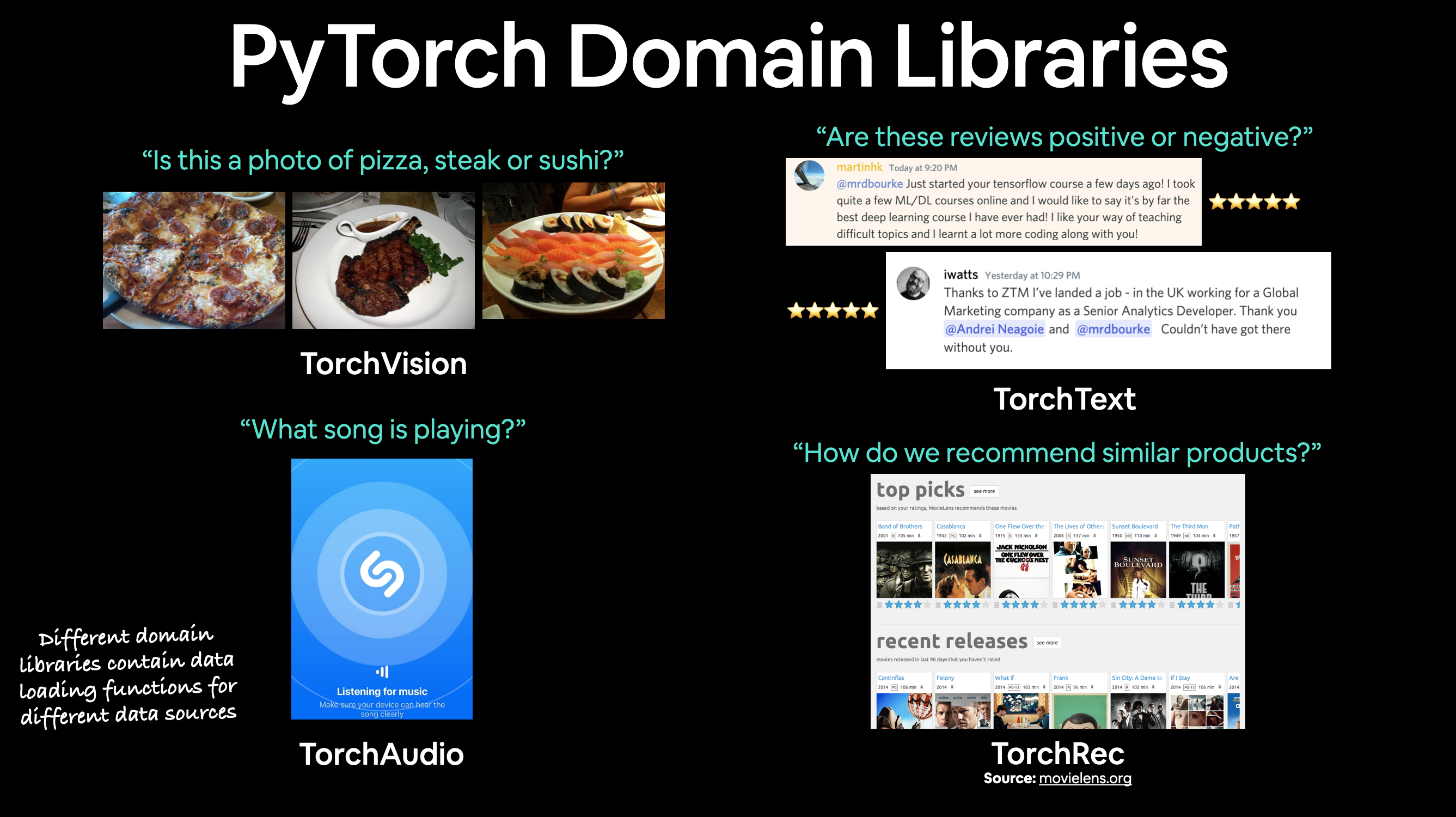
PyTorch includes many existing functions to load in various custom datasets in the TorchVision, TorchText, TorchAudio and TorchRec domain libraries.
But sometimes these existing functions may not be enough.
In that case, we can always subclass torch.utils.data.Dataset and customize it to our liking.
What we're going to cover
We're going to be applying the PyTorch Workflow we covered in notebook 01 and notebook 02 to a computer vision problem.
But instead of using an in-built PyTorch dataset, we're going to be using our own dataset of pizza, steak and sushi images.
The goal will be to load these images and then build a model to train and predict on them.
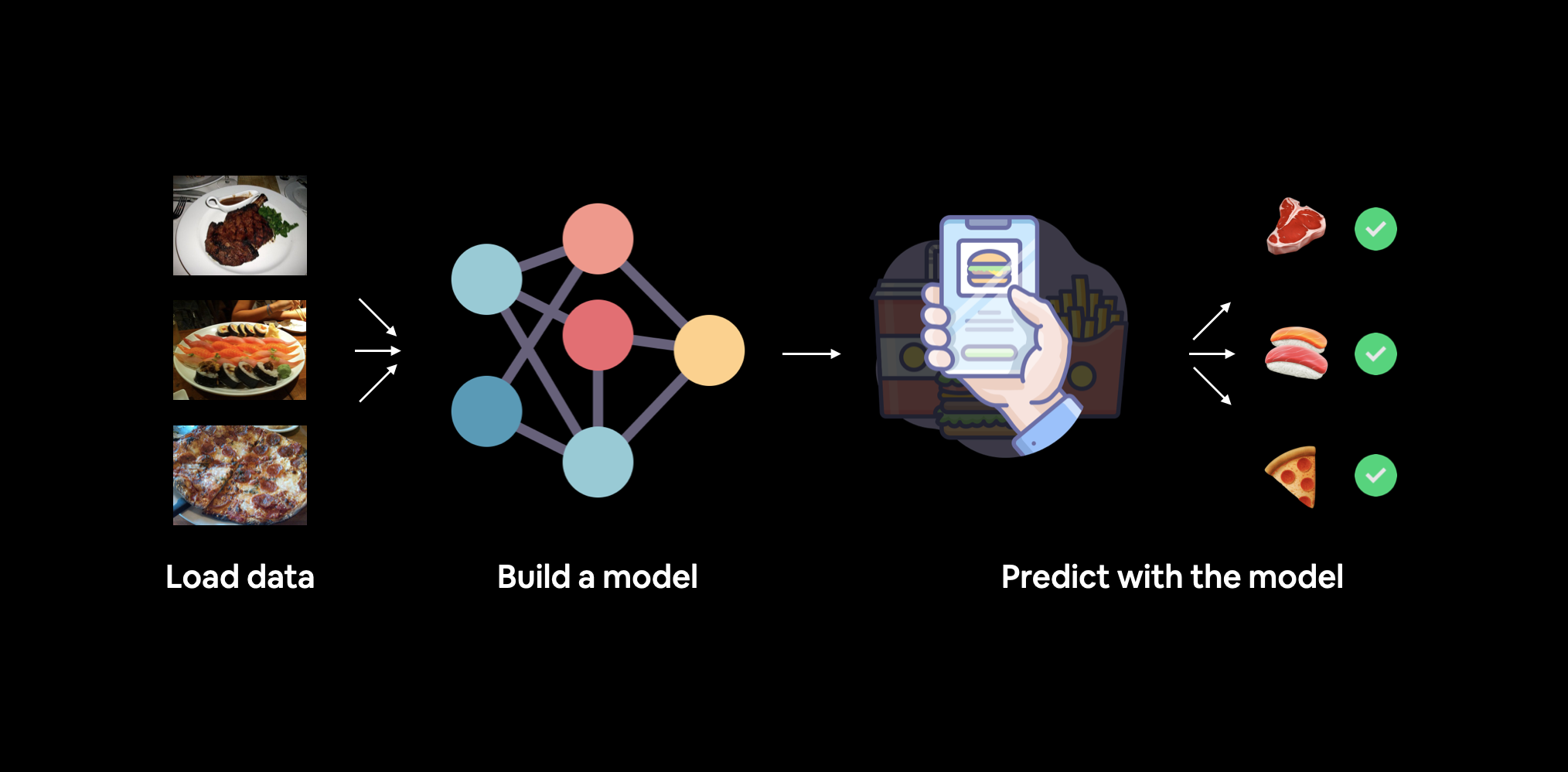
What we're going to build. We'll use torchvision.datasets as well as our own custom Dataset class to load in images of food and then we'll build a PyTorch computer vision model to hopefully be able to classify them.
Specifically, we're going to cover:
| Topic | Contents |
|---|---|
| 0. Importing PyTorch and setting up device-agnostic code | Let's get PyTorch loaded and then follow best practice to setup our code to be device-agnostic. |
| 1. Get data | We're going to be using our own custom dataset of pizza, steak and sushi images. |
| 2. Become one with the data (data preparation) | At the beginning of any new machine learning problem, it's paramount to understand the data you're working with. Here we'll take some steps to figure out what data we have. |
| 3. Transforming data | Often, the data you get won't be 100% ready to use with a machine learning model, here we'll look at some steps we can take to transform our images so they're ready to be used with a model. |
4. Loading data with ImageFolder (option 1) |
PyTorch has many in-built data loading functions for common types of data. ImageFolder is helpful if our images are in standard image classification format. |
5. Loading image data with a custom Dataset |
What if PyTorch didn't have an in-built function to load data with? This is where we can build our own custom subclass of torch.utils.data.Dataset. |
| 6. Other forms of transforms (data augmentation) | Data augmentation is a common technique for expanding the diversity of your training data. Here we'll explore some of torchvision's in-built data augmentation functions. |
| 7. Model 0: TinyVGG without data augmentation | By this stage, we'll have our data ready, let's build a model capable of fitting it. We'll also create some training and testing functions for training and evaluating our model. |
| 8. Exploring loss curves | Loss curves are a great way to see how your model is training/improving over time. They're also a good way to see if your model is underfitting or overfitting. |
| 9. Model 1: TinyVGG with data augmentation | By now, we've tried a model without, how about we try one with data augmentation? |
| 10. Compare model results | Let's compare our different model's loss curves and see which performed better and discuss some options for improving performance. |
| 11. Making a prediction on a custom image | Our model is trained to on a dataset of pizza, steak and sushi images. In this section we'll cover how to use our trained model to predict on an image outside of our existing dataset. |
import torch
from torch import nn

# Note: this notebook requires torch >= 1.10.0
torch.__version__'1.11.0'
# Setup device-agnostic code
device = "cuda" if torch.cuda.is_available() else "cpu"
device'cuda'
import requests
import zipfile
from pathlib import Path

# Setup path to data folder
data_path = Path("data/")
image_path = data_path / "pizza_steak_sushi"

# If the image folder doesn't exist, download it and prepare it...
if image_path.is_dir():
    print(f"{image_path} directory exists.")
else:
    print(f"Did not find {image_path} directory, creating one...")
    image_path.mkdir(parents=True, exist_ok=True)

# Download pizza, steak, sushi data
with open(data_path / "pizza_steak_sushi.zip", "wb") as f:
    request = requests.get("https://github.com/mrdbourke/pytorch-deep-learning/raw/main/data/pizza_steak_sushi.zip")
    print("Downloading pizza, steak, sushi data...")
    f.write(request.content)

# Unzip pizza, steak, sushi data
with zipfile.ZipFile(data_path / "pizza_steak_sushi.zip", "r") as zip_ref:
    print("Unzipping pizza, steak, sushi data...")
    zip_ref.extractall(image_path)
data/pizza_steak_sushi directory exists. Downloading pizza, steak, sushi data... Unzipping pizza, steak, sushi data...
2. Become one with the data (data preparation)
Dataset downloaded!
Time to become one with it.
This is another important step before building a model.
As Abraham Lossfunction said...

Data preparation is paramount. Before building a model, become one with the data. Ask: What am I trying to do here? Source: @mrdbourke Twitter.
What's inspecting the data and becoming one with it?
Before starting a project or building any kind of model, it's important to know what data you're working with.
In our case, we have images of pizza, steak and sushi in standard image classification format.
Image classification format contains separate classes of images in seperate directories titled with a particular class name.
For example, all images of pizza are contained in the pizza/ directory.
This format is popular across many different image classification benchmarks, including ImageNet (of the most popular computer vision benchmark datasets).
You can see an example of the storage format below, the images numbers are arbitrary.
pizza_steak_sushi/ <- overall dataset folder
    train/ <- training images
        pizza/ <- class name as folder name
            image01.jpeg
            image02.jpeg
            ...
        steak/
            image24.jpeg
            image25.jpeg
            ...
        sushi/
            image37.jpeg
            ...
    test/ <- testing images
        pizza/
            image101.jpeg
            image102.jpeg
            ...
        steak/
            image154.jpeg
            image155.jpeg
            ...
        sushi/
            image167.jpeg
            ...
The goal will be to take this data storage structure and turn it into a dataset usable with PyTorch.
Note: The structure of the data you work with will vary depending on the problem you're working on. But the premise still remains: become one with the data, then find a way to best turn it into a dataset compatible with PyTorch.
We can inspect what's in our data directory by writing a small helper function to walk through each of the subdirectories and count the files present.
To do so, we'll use Python's in-built os.walk().
import os
def walk_through_dir(dir_path):
  """
  Walks through dir_path returning its contents.
  Args:
    dir_path (str or pathlib.Path): target directory

  Returns:
    A print out of:
      number of subdiretories in dir_path
      number of images (files) in each subdirectory
      name of each subdirectory
  """
  for dirpath, dirnames, filenames in os.walk(dir_path):
print(f"There are {len(dirnames)} directories and {len(filenames)} images in '{dirpath}'.")walk_through_dir(image_path)There are 2 directories and 0 images in 'data/pizza_steak_sushi'. There are 3 directories and 0 images in 'data/pizza_steak_sushi/test'. There are 0 directories and 19 images in 'data/pizza_steak_sushi/test/steak'. There are 0 directories and 31 images in 'data/pizza_steak_sushi/test/sushi'. There are 0 directories and 25 images in 'data/pizza_steak_sushi/test/pizza'. There are 3 directories and 0 images in 'data/pizza_steak_sushi/train'. There are 0 directories and 75 images in 'data/pizza_steak_sushi/train/steak'. There are 0 directories and 72 images in 'data/pizza_steak_sushi/train/sushi'. There are 0 directories and 78 images in 'data/pizza_steak_sushi/train/pizza'.
# Setup train and testing paths
train_dir = image_path / "train"
test_dir = image_path / "test"

train_dir, test_dir(PosixPath('data/pizza_steak_sushi/train'),
PosixPath('data/pizza_steak_sushi/test'))import random
from PIL import Image
# Set seed
random.seed(42) # <- try changing this and see what happens
# 1. Get all image paths (* means "any combination")
image_path_list = list(image_path.glob("*/*/*.jpg"))
# 2. Get random image path
random_image_path = random.choice(image_path_list)
# 3. Get image class from path name (the image class is the name of the directory where the image is stored)
image_class = random_image_path.parent.stem
# 4. Open image
img = Image.open(random_image_path)
# 5. Print metadata
print(f"Random image path: {random_image_path}")
print(f"Image class: {image_class}")
print(f"Image height: {img.height}")
print(f"Image width: {img.width}")
imgRandom image path: data/pizza_steak_sushi/test/pizza/2124579.jpg Image class: pizza Image height: 384 Image width: 512

import numpy as np
import matplotlib.pyplot as plt

# Turn the image into an array
img_as_array = np.asarray(img)

# Plot the image with matplotlib
plt.figure(figsize=(10, 7))
plt.imshow(img_as_array)
plt.title(f"Image class: {image_class} | Image shape: {img_as_array.shape} -> [height, width, color_channels]")
plt.axis(False);
import torch
from torch.utils.data import DataLoader
from torchvision import datasets, transforms# Write transform for image
data_transform = transforms.Compose([
# Resize the images to 64x64
transforms.Resize(size=(64, 64)),
# Flip the images randomly on the horizontal
transforms.RandomHorizontalFlip(p=0.5), # p = probability of flip, 0.5 = 50% chance
# Turn the image into a torch.Tensor
transforms.ToTensor() # this also converts all pixel values from 0 to 255 to be between 0.0 and 1.0
])def plot_transformed_images(image_paths, transform, n=3, seed=42):
"""Plots a series of random images from image_paths.
Will open n image paths from image_paths, transform them
with transform and plot them side by side.
Args:
image_paths (list): List of target image paths.
transform (PyTorch Transforms): Transforms to apply to images.
n (int, optional): Number of images to plot. Defaults to 3.
seed (int, optional): Random seed for the random generator. Defaults to 42.
"""
random.seed(seed)
random_image_paths = random.sample(image_paths, k=n)
for image_path in random_image_paths:
with Image.open(image_path) as f:
fig, ax = plt.subplots(1, 2)
ax[0].imshow(f)
ax[0].set_title(f"Original \nSize: {f.size}")
ax[0].axis("off")
# Transform and plot image
# Note: permute() will change shape of image to suit matplotlib
# (PyTorch default is [C, H, W] but Matplotlib is [H, W, C])
transformed_image = transform(f).permute(1, 2, 0)
ax[1].imshow(transformed_image)
ax[1].set_title(f"Transformed \nSize: {transformed_image.shape}")
ax[1].axis("off")
fig.suptitle(f"Class: {image_path.parent.stem}", fontsize=16)
plot_transformed_images(image_path_list,
transform=data_transform,
n=3)


# Use ImageFolder to create dataset(s)
from torchvision import datasets
train_data = datasets.ImageFolder(root=train_dir, # target folder of images
                                  transform=data_transform, # transforms to perform on data (images)
                                  target_transform=None) # transforms to perform on labels (if necessary)

test_data = datasets.ImageFolder(root=test_dir,
                                 transform=data_transform)

print(f"Train data:\n{train_data}\nTest data:\n{test_data}")
Train data:
Dataset ImageFolder
Number of datapoints: 225
Root location: data/pizza_steak_sushi/train
StandardTransform
Transform: Compose(
Resize(size=(64, 64), interpolation=bilinear, max_size=None, antialias=None)
RandomHorizontalFlip(p=0.5)
ToTensor()
)
Test data:
Dataset ImageFolder
Number of datapoints: 75
Root location: data/pizza_steak_sushi/test
StandardTransform
Transform: Compose(
Resize(size=(64, 64), interpolation=bilinear, max_size=None, antialias=None)
RandomHorizontalFlip(p=0.5)
ToTensor()
)
# Get class names as a list
class_names = train_data.classes
class_names['pizza', 'steak', 'sushi']
# Can also get class names as a dict
class_dict = train_data.class_to_idx
class_dict{'pizza': 0, 'steak': 1, 'sushi': 2}# Check the lengths
len(train_data), len(test_data)(225, 75)
img, label = train_data[0][0], train_data[0][1]
print(f"Image tensor:\n{img}")
print(f"Image shape: {img.shape}")
print(f"Image datatype: {img.dtype}")
print(f"Image label: {label}")
print(f"Label datatype: {type(label)}")
Image tensor:
tensor([[[0.1176, 0.1216, 0.1255, ..., 0.0980, 0.1020, 0.1137],
[0.1294, 0.1294, 0.1294, ..., 0.0980, 0.0980, 0.1059],
[0.1333, 0.1333, 0.1333, ..., 0.0941, 0.0980, 0.1020],
...,
[0.1686, 0.1647, 0.1686, ..., 0.1255, 0.1098, 0.1098],
[0.1686, 0.1647, 0.1686, ..., 0.1098, 0.0941, 0.0863],
[0.1647, 0.1647, 0.1686, ..., 0.0980, 0.0863, 0.0863]],
[[0.0588, 0.0588, 0.0588, ..., 0.0745, 0.0706, 0.0745],
[0.0627, 0.0627, 0.0627, ..., 0.0745, 0.0706, 0.0706],
[0.0706, 0.0706, 0.0706, ..., 0.0745, 0.0745, 0.0706],
...,
[0.2392, 0.2392, 0.2510, ..., 0.1373, 0.1333, 0.1255],
[0.2314, 0.2392, 0.2510, ..., 0.1255, 0.1176, 0.1098],
[0.2275, 0.2353, 0.2431, ..., 0.1137, 0.1059, 0.1020]],
[[0.0196, 0.0196, 0.0196, ..., 0.0902, 0.0902, 0.0941],
[0.0196, 0.0157, 0.0196, ..., 0.0902, 0.0863, 0.0902],
[0.0196, 0.0157, 0.0157, ..., 0.0902, 0.0902, 0.0902],
...,
[0.1804, 0.1882, 0.1961, ..., 0.1490, 0.1333, 0.1294],
[0.1804, 0.1843, 0.1922, ..., 0.1255, 0.1137, 0.1098],
[0.1765, 0.1804, 0.1843, ..., 0.1059, 0.1020, 0.1059]]])
Image shape: torch.Size([3, 64, 64])
Image datatype: torch.float32
Image label: 0
Label datatype: <class 'int'>
# Rearrange the order of dimensions
img_permute = img.permute(1, 2, 0)

# Print out different shapes (before and after permute)
print(f"Original shape: {img.shape} -> [color_channels, height, width]")
print(f"Image permute shape: {img_permute.shape} -> [height, width, color_channels]")

# Plot the image
plt.figure(figsize=(10, 7))
plt.imshow(img.permute(1, 2, 0))
plt.axis("off")
plt.title(class_names[label], fontsize=14);
Original shape: torch.Size([3, 64, 64]) -> [color_channels, height, width] Image permute shape: torch.Size([64, 64, 3]) -> [height, width, color_channels]

# Turn train and test Datasets into DataLoaders
from torch.utils.data import DataLoader
train_dataloader = DataLoader(dataset=train_data,
                              batch_size=1, # how many samples per batch?
                              num_workers=1, # how many subprocesses to use for data loading? (higher = more)
                              shuffle=True) # shuffle the data?

test_dataloader = DataLoader(dataset=test_data,
                             batch_size=1,
                             num_workers=1,
                             shuffle=False) # don't usually need to shuffle testing data

train_dataloader, test_dataloader(<torch.utils.data.dataloader.DataLoader at 0x7fe3d96e3b50>, <torch.utils.data.dataloader.DataLoader at 0x7fe3d9460d30>)
img, label = next(iter(train_dataloader))

# Batch size will now be 1, try changing the batch_size parameter above and see what happens
print(f"Image shape: {img.shape} -> [batch_size, color_channels, height, width]")
print(f"Label shape: {label.shape}")
Image shape: torch.Size([1, 3, 64, 64]) -> [batch_size, color_channels, height, width] Label shape: torch.Size([1])
import os
import pathlib
import torch

from PIL import Image
from torch.utils.data import Dataset
from torchvision import transforms
from typing import Tuple, Dict, List# Instance of torchvision.datasets.ImageFolder()
train_data.classes, train_data.class_to_idx(['pizza', 'steak', 'sushi'], {'pizza': 0, 'steak': 1, 'sushi': 2})# Setup path for target directory
target_directory = train_dir
print(f"Target directory: {target_directory}")
# Get the class names from the target directory
class_names_found = sorted([entry.name for entry in list(os.scandir(image_path / "train"))])
print(f"Class names found: {class_names_found}")Target directory: data/pizza_steak_sushi/train Class names found: ['pizza', 'steak', 'sushi']
# Make function to find classes in target directory
def find_classes(directory: str) -> Tuple[List[str], Dict[str, str]]:
    """Finds the class folder names in a target directory.

    Assumes target directory is in standard image classification format.

    Args:
        directory ([str]): target directory to load classnames from.

    Returns:
        Tuple[List[str], Dict[str, str]]: (list_of_class_names, dict(idx: class_name...))

    Example:
        find_classes("food_images/train")
        >>> (["class_1", "class_2"], {"class_1": 0, ...})
    """
    # 1. Get the class names by scanning the target directory
    classes = sorted(entry.name for entry in os.scandir(directory) if entry.is_dir())

    # 2. Raise an error if class names not found
    if not classes:
        raise FileNotFoundError(f"Couldn't find any classes in {directory}.")

    # 3. Crearte a dictionary of index labels (computers prefer numerical rather than string labels)
    class_to_idx = {cls_name: i for i, cls_name in enumerate(classes)}
return classes, class_to_idxfind_classes(train_dir)(['pizza', 'steak', 'sushi'], {'pizza': 0, 'steak': 1, 'sushi': 2})# Write a custom dataset class (inherits from torch.utils.data.Dataset)
from torch.utils.data import Dataset
# 1. Subclass torch.utils.data.Dataset()
class ImageFolderCustom(Dataset):
# 2. Initialize with a targ_dir and transform (optional) parameter
def __init__(self, targ_dir, transform=None):
# 3. Create class attributes
# Get all image paths
self.paths = list(pathlib.Path(targ_dir).glob("*/*.jpg")) # note: you'd have to update this if you've got .png's or .jpeg's
# Setup transforms
self.transform = transform
# Create classes and class_to_idx attributes
self.classes, self.class_to_idx = find_classes(targ_dir)
# 4. Make function to load images
def load_image(self, index) -> Image.Image:
"Opens an image via a path and returns it."
image_path = self.paths[index]
return Image.open(image_path)
# 5. Overwrite the __len__() method (optional but recommended for subclasses of torch.utils.data.Dataset)
def __len__(self):
"Returns the total number of samples."
return len(self.paths)
# 6. Overwrite the __getitem__() method (required for subclasses of torch.utils.data.Dataset)
def __getitem__(self, index) -> Tuple[torch.Tensor, int]:
"Returns one sample of data, data and label (X, y)."
img = self.load_image(index)
class_name = self.paths[index].parent.name # expects path in data_folder/class_name/image.jpeg
class_idx = self.class_to_idx[class_name]
# Transform if necessary
if self.transform:
return self.transform(img), class_idx # return data, label (X, y)
else:
return img, class_idx # return data, label (X, y)# Augment train data
train_transforms = transforms.Compose([
transforms.Resize((64, 64)),
transforms.RandomHorizontalFlip(p=0.5),
transforms.ToTensor()
])
# Don't augment test data, only reshape
test_transforms = transforms.Compose([
transforms.Resize((64, 64)),
transforms.ToTensor()
])train_data_custom = ImageFolderCustom(targ_dir=train_dir,
transform=train_transforms)
test_data_custom = ImageFolderCustom(targ_dir=test_dir,
transform=test_transforms)
train_data_custom, test_data_custom(<__main__.ImageFolderCustom at 0x7fe3d93f34f0>, <__main__.ImageFolderCustom at 0x7fe3d93f3be0>)
len(train_data_custom), len(test_data_custom)(225, 75)
train_data_custom.classes['pizza', 'steak', 'sushi']
train_data_custom.class_to_idx{'pizza': 0, 'steak': 1, 'sushi': 2}# Check for equality amongst our custom Dataset and ImageFolder Dataset
print((len(train_data_custom) == len(train_data)) & (len(test_data_custom) == len(test_data)))
print(train_data_custom.classes == train_data.classes)
print(train_data_custom.class_to_idx == train_data.class_to_idx)True True True
# 1. Take in a Dataset as well as a list of class names
def display_random_images(dataset: torch.utils.data.dataset.Dataset,
                          classes: List=None,
                          n: int=10,
                          display_shape: bool=True,
                          seed: int=None):

    # 2. Adjust display if n too high
    if n > 10:
        n = 10
        display_shape=False
        print(f"For display purposes, n shouldn't be larger than 10, setting to 10 and removing shape display.")

    # 3. Set random seed
    if seed:
        random.seed(seed)

    # 4. Get random sample indexes
    random_samples_idx = random.sample(range(len(dataset)), k=n)

    # 5. Setup plot
    plt.figure(figsize=(16, 8))

    # 6. Loop through samples and display random samples
    for i, targ_sample in enumerate(random_samples_idx):
        targ_image, targ_label = dataset[targ_sample][0], dataset[targ_sample][1]

        # 7. Adjust image tensor shape for plotting: [color_channels, height, width] -> [color_channels, height, width]
        targ_image_adjust = targ_image.permute(1, 2, 0)

        # Plot adjusted samples
        plt.subplot(1, n, i+1)
        plt.imshow(targ_image_adjust)
        plt.axis("off")
        if classes:
            title = f"class: {classes[targ_label]}"
            if display_shape:
                title = title + f"\nshape: {targ_image_adjust.shape}"
plt.title(title)# Display random images from ImageFolder created Dataset
display_random_images(train_data,
n=5,
classes=class_names,
seed=None)
# Display random images from ImageFolderCustom Dataset
display_random_images(train_data_custom,
                      n=12,
                      classes=class_names,
                      seed=None) # Try setting the seed for reproducible images
For display purposes, n shouldn't be larger than 10, setting to 10 and removing shape display.

# Turn train and test custom Dataset's into DataLoader's
from torch.utils.data import DataLoader
train_dataloader_custom = DataLoader(dataset=train_data_custom, # use custom created train Dataset
                                     batch_size=1, # how many samples per batch?
                                     num_workers=1, # how many subprocesses to use for data loading? (higher = more)
                                     shuffle=True) # shuffle the data?

test_dataloader_custom = DataLoader(dataset=test_data_custom, # use custom created test Dataset
                                    batch_size=1,
                                    num_workers=1,
                                    shuffle=False) # don't usually need to shuffle testing data

train_dataloader_custom, test_dataloader_custom(<torch.utils.data.dataloader.DataLoader at 0x7fe3d8bb4f70>, <torch.utils.data.dataloader.DataLoader at 0x7fe3d95e3e80>)
# Get image and label from custom DataLoader
img_custom, label_custom = next(iter(train_dataloader_custom))

# Batch size will now be 1, try changing the batch_size parameter above and see what happens
print(f"Image shape: {img_custom.shape} -> [batch_size, color_channels, height, width]")
print(f"Label shape: {label_custom.shape}")
Image shape: torch.Size([1, 3, 64, 64]) -> [batch_size, color_channels, height, width] Label shape: torch.Size([1])
6. Other forms of transforms (data augmentation)
We've seen a couple of transforms on our data already but there's plenty more.
You can see them all in the torchvision.transforms documentation.
The purpose of tranforms is to alter your images in some way.
That may be turning your images into a tensor (as we've seen before).
Or cropping it or randomly erasing a portion or randomly rotating them.
Doing this kinds of transforms is often referred to as data augmentation.
Data augmentation is the process of altering your data in such a way that you artificially increase the diversity of your training set.
Training a model on this artificially altered dataset hopefully results in a model that is capable of better generalization (the patterns it learns are more robust to future unseen examples).
You can see many different examples of data augmentation performed on images using torchvision.transforms in PyTorch's Illustration of Transforms example.
But let's try one out ourselves.
Machine learning is all about harnessing the power of randomness and research shows that random transforms (like transforms.RandAugment() and transforms.TrivialAugmentWide()) generally perform better than hand-picked transforms.
The idea behind TrivialAugment is... well, trivial.
You have a set of transforms and you randomly pick a number of them to perform on an image and at a random magnitude between a given range (a higher magnitude means more instense).
The PyTorch team even used TrivialAugment it to train their latest state-of-the-art vision models.
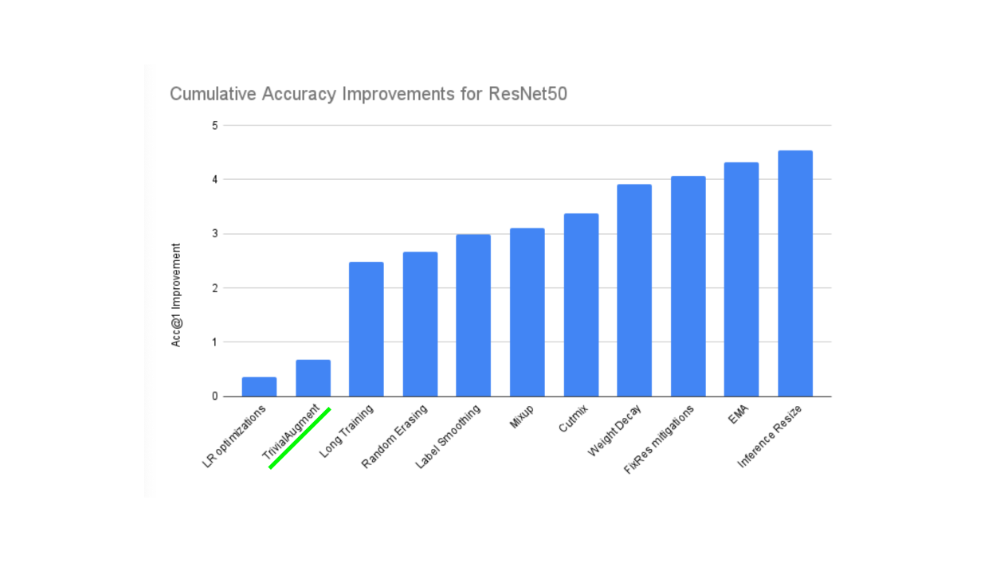
TrivialAugment was one of the ingredients used in a recent state of the art training upgrade to various PyTorch vision models.
How about we test it out on some of our own images?
The main parameter to pay attention to in transforms.TrivialAugmentWide() is num_magnitude_bins=31.
It defines how much of a range an intensity value will be picked to apply a certain transform, 0 being no range and 31 being maximum range (highest chance for highest intensity).
We can incorporate transforms.TrivialAugmentWide() into transforms.Compose().
from torchvision import transforms

train_transforms = transforms.Compose([
    transforms.Resize((224, 224)),
    transforms.TrivialAugmentWide(num_magnitude_bins=31), # how intense
    transforms.ToTensor() # use ToTensor() last to get everything between 0 & 1
])

# Don't need to perform augmentation on the test data
test_transforms = transforms.Compose([
    transforms.Resize((224, 224)),
    transforms.ToTensor()
])# Get all image paths
image_path_list = list(image_path.glob("*/*/*.jpg"))
# Plot random images
plot_transformed_images(image_paths=image_path_list,
transform=train_transforms,
n=3,
seed=None
)


# Create simple transform
simple_transform = transforms.Compose([
    transforms.Resize((64, 64)),
    transforms.ToTensor(),
])# 1. Load and transform data
from torchvision import datasets
train_data_simple = datasets.ImageFolder(root=train_dir, transform=simple_transform)
test_data_simple = datasets.ImageFolder(root=test_dir, transform=simple_transform)
# 2. Turn data into DataLoaders
import os
from torch.utils.data import DataLoader
# Setup batch size and number of workers
BATCH_SIZE = 32
NUM_WORKERS = os.cpu_count()
print(f"Creating DataLoader's with batch size {BATCH_SIZE} and {NUM_WORKERS} workers.")
# Create DataLoader's
train_dataloader_simple = DataLoader(train_data_simple,
batch_size=BATCH_SIZE,
shuffle=True,
num_workers=NUM_WORKERS)
test_dataloader_simple = DataLoader(test_data_simple,
batch_size=BATCH_SIZE,
shuffle=False,
num_workers=NUM_WORKERS)
train_dataloader_simple, test_dataloader_simpleCreating DataLoader's with batch size 32 and 16 workers.
(<torch.utils.data.dataloader.DataLoader at 0x7fe3cd789850>,
 <torch.utils.data.dataloader.DataLoader at 0x7fe3cd7932e0>)
class TinyVGG(nn.Module):
    """
    Model architecture copying TinyVGG from:
    https://poloclub.github.io/cnn-explainer/
    """
    def __init__(self, input_shape: int, hidden_units: int, output_shape: int):
        super().__init__()
        self.conv_block_1 = nn.Sequential(
            nn.Conv2d(in_channels=input_shape,
                      out_channels=hidden_units,
                      kernel_size=3, # how big is the square that's going over the image?
                      stride=1, # default
                      padding=1), # options = "valid" (no padding) or "same" (output has same shape as input) or int for specific number
            nn.ReLU(),
            nn.Conv2d(in_channels=hidden_units,
                      out_channels=hidden_units,
                      kernel_size=3,
                      stride=1,
                      padding=1),
            nn.ReLU(),
            nn.MaxPool2d(kernel_size=2,
                         stride=2) # default stride value is same as kernel_size
        )
        self.conv_block_2 = nn.Sequential(
            nn.Conv2d(hidden_units, hidden_units, kernel_size=3, padding=1),
            nn.ReLU(),
            nn.Conv2d(hidden_units, hidden_units, kernel_size=3, padding=1),
            nn.ReLU(),
            nn.MaxPool2d(2)
        )
        self.classifier = nn.Sequential(
            nn.Flatten(),
            # Where did this in_features shape come from?
            # It's because each layer of our network compresses and changes the shape of our inputs data.
            nn.Linear(in_features=hidden_units*16*16,
                      out_features=output_shape)
        )

    def forward(self, x: torch.Tensor):
        x = self.conv_block_1(x)
        # print(x.shape)
        x = self.conv_block_2(x)
        # print(x.shape)
        x = self.classifier(x)
        # print(x.shape)
        return x
        # return self.classifier(self.block_2(self.block_1(x))) # <- leverage the benefits of operator fusion

torch.manual_seed(42)
model_0 = TinyVGG(input_shape=3, # number of color channels (3 for RGB)
                  hidden_units=10,
                  output_shape=len(train_data.classes)).to(device)
model_0TinyVGG(
(conv_block_1): Sequential(
(0): Conv2d(3, 10, kernel_size=(3, 3), stride=(1, 1), padding=(1, 1))
(1): ReLU()
(2): Conv2d(10, 10, kernel_size=(3, 3), stride=(1, 1), padding=(1, 1))
(3): ReLU()
(4): MaxPool2d(kernel_size=2, stride=2, padding=0, dilation=1, ceil_mode=False)
)
(conv_block_2): Sequential(
(0): Conv2d(10, 10, kernel_size=(3, 3), stride=(1, 1), padding=(1, 1))
(1): ReLU()
(2): Conv2d(10, 10, kernel_size=(3, 3), stride=(1, 1), padding=(1, 1))
(3): ReLU()
(4): MaxPool2d(kernel_size=2, stride=2, padding=0, dilation=1, ceil_mode=False)
)
(classifier): Sequential(
(0): Flatten(start_dim=1, end_dim=-1)
(1): Linear(in_features=2560, out_features=3, bias=True)
)
)# 1. Get a batch of images and labels from the DataLoader
img_batch, label_batch = next(iter(train_dataloader_simple))
# 2. Get a single image from the batch and unsqueeze the image so its shape fits the model
img_single, label_single = img_batch[0].unsqueeze(dim=0), label_batch[0]
print(f"Single image shape: {img_single.shape}\n")
# 3. Perform a forward pass on a single image
model_0.eval()
with torch.inference_mode():
pred = model_0(img_single.to(device))
# 4. Print out what's happening and convert model logits -> pred probs -> pred label
print(f"Output logits:\n{pred}\n")
print(f"Output prediction probabilities:\n{torch.softmax(pred, dim=1)}\n")
print(f"Output prediction label:\n{torch.argmax(torch.softmax(pred, dim=1), dim=1)}\n")
print(f"Actual label:\n{label_single}")Single image shape: torch.Size([1, 3, 64, 64]) Output logits: tensor([[0.0578, 0.0634, 0.0352]], device='cuda:0') Output prediction probabilities: tensor([[0.3352, 0.3371, 0.3277]], device='cuda:0') Output prediction label: tensor([1], device='cuda:0') Actual label: 2
# TK - Install torchinfo if it's not available, import it if it is
try:
    import torchinfo
except:
    !pip install torchinfo
    import torchinfo

from torchinfo import summary
summary(model_0, input_size=[1, 3, 64, 64]) # do a test pass through of an example input size ========================================================================================== Layer (type:depth-idx) Output Shape Param # ========================================================================================== TinyVGG -- -- ├─Sequential: 1-1 [1, 10, 32, 32] -- │ └─Conv2d: 2-1 [1, 10, 64, 64] 280 │ └─ReLU: 2-2 [1, 10, 64, 64] -- │ └─Conv2d: 2-3 [1, 10, 64, 64] 910 │ └─ReLU: 2-4 [1, 10, 64, 64] -- │ └─MaxPool2d: 2-5 [1, 10, 32, 32] -- ├─Sequential: 1-2 [1, 10, 16, 16] -- │ └─Conv2d: 2-6 [1, 10, 32, 32] 910 │ └─ReLU: 2-7 [1, 10, 32, 32] -- │ └─Conv2d: 2-8 [1, 10, 32, 32] 910 │ └─ReLU: 2-9 [1, 10, 32, 32] -- │ └─MaxPool2d: 2-10 [1, 10, 16, 16] -- ├─Sequential: 1-3 [1, 3] -- │ └─Flatten: 2-11 [1, 2560] -- │ └─Linear: 2-12 [1, 3] 7,683 ========================================================================================== Total params: 10,693 Trainable params: 10,693 Non-trainable params: 0 Total mult-adds (M): 6.75 ========================================================================================== Input size (MB): 0.05 Forward/backward pass size (MB): 0.82 Params size (MB): 0.04 Estimated Total Size (MB): 0.91 ==========================================================================================
def train_step(model: torch.nn.Module,
               dataloader: torch.utils.data.DataLoader,
               loss_fn: torch.nn.Module,
               optimizer: torch.optim):
    # Put model in train mode
    model.train()

    # Setup train loss and train accuracy values
    train_loss, train_acc = 0, 0

    # Loop through data loader data batches
    for batch, (X, y) in enumerate(dataloader):
        # Send data to target device
        X, y = X.to(device), y.to(device)

        # 1. Forward pass
        y_pred = model(X)

        # 2. Calculate  and accumulate loss
        loss = loss_fn(y_pred, y)
        train_loss += loss.item()

        # 3. Optimizer zero grad
        optimizer.zero_grad()

        # 4. Loss backward
        loss.backward()

        # 5. Optimizer step
        optimizer.step()

        # Calculate and accumulate accuracy metric across all batches
        y_pred_class = torch.argmax(torch.softmax(y_pred, dim=1), dim=1)
        train_acc += (y_pred_class == y).sum().item()/len(y_pred)

    # Adjust metrics to get average loss and accuracy per batch
    train_loss = train_loss / len(dataloader)
    train_acc = train_acc / len(dataloader)
return train_loss, train_accdef test_step(model: torch.nn.Module,
dataloader: torch.utils.data.DataLoader,
loss_fn: torch.optim):
# Put model in eval mode
model.eval()
# Setup test loss and test accuracy values
test_loss, test_acc = 0, 0
# Turn on inference context manager
with torch.inference_mode():
# Loop through DataLoader batches
for batch, (X, y) in enumerate(dataloader):
# Send data to target device
X, y = X.to(device), y.to(device)
# 1. Forward pass
test_pred_logits = model(X)
# 2. Calculate and accumulate loss
loss = loss_fn(test_pred_logits, y)
test_loss += loss.item()
# Calculate and accumulate accuracy
test_pred_labels = test_pred_logits.argmax(dim=1)
test_acc += ((test_pred_labels == y).sum().item()/len(test_pred_labels))
# Adjust metrics to get average loss and accuracy per batch
test_loss = test_loss / len(dataloader)
test_acc = test_acc / len(dataloader)
return test_loss, test_acc