
729 KiB

What is transfer learning?
Transfer learning allows us to take the patterns (also called weights) another model has learned from another problem and use them for our own problem.
For example, we can take the patterns a computer vision model has learned from datasets such as ImageNet (millions of images of different objects) and use them to power our FoodVision Mini model.
Or we could take the patterns from a langauge model (a model that's been through large amounts of text to learn a representation of language) and use them as the basis of a model to classify different text samples.
The premise remains: find a well-performing existing model and apply it to your own problem.
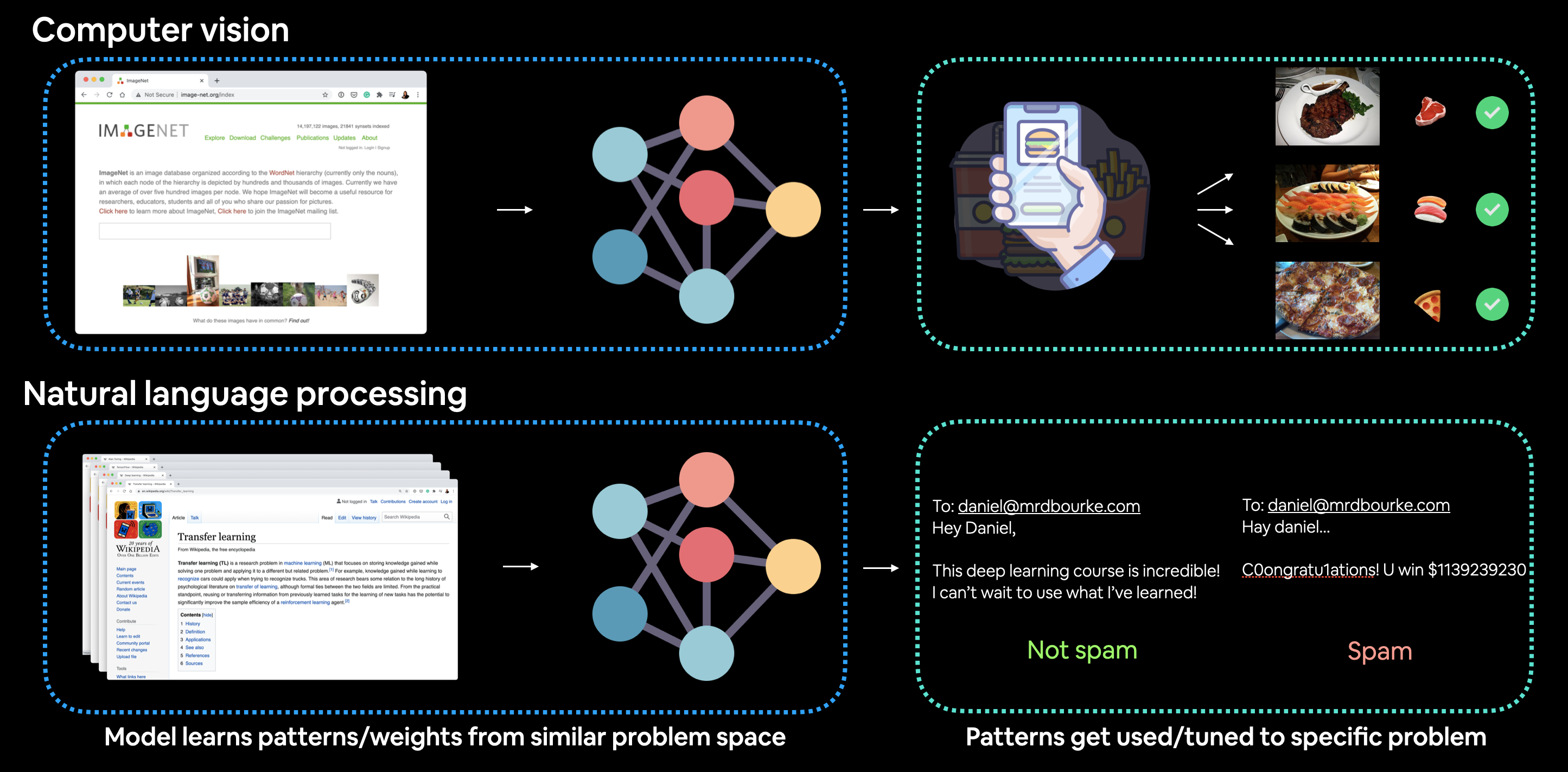
Example of transfer learning being applied to computer vision and natural language processing (NLP). In the case of computer vision, a computer vision model might learn patterns on millions of images in ImageNet and then use those patterns to infer on another problem. And for NLP, a language model may learn the structure of language by reading all of Wikipedia (and perhaps more) and then apply that knowledge to a different problem.
Why use transfer learning?
There are two main benefits to using transfer learning:
- Can leverage an existing model (usually a neural network architecture) proven to work on problems similar to our own.
- Can leverage a working model which has already learned patterns on similar data to our own. This often results in achieving great results with less custom data.
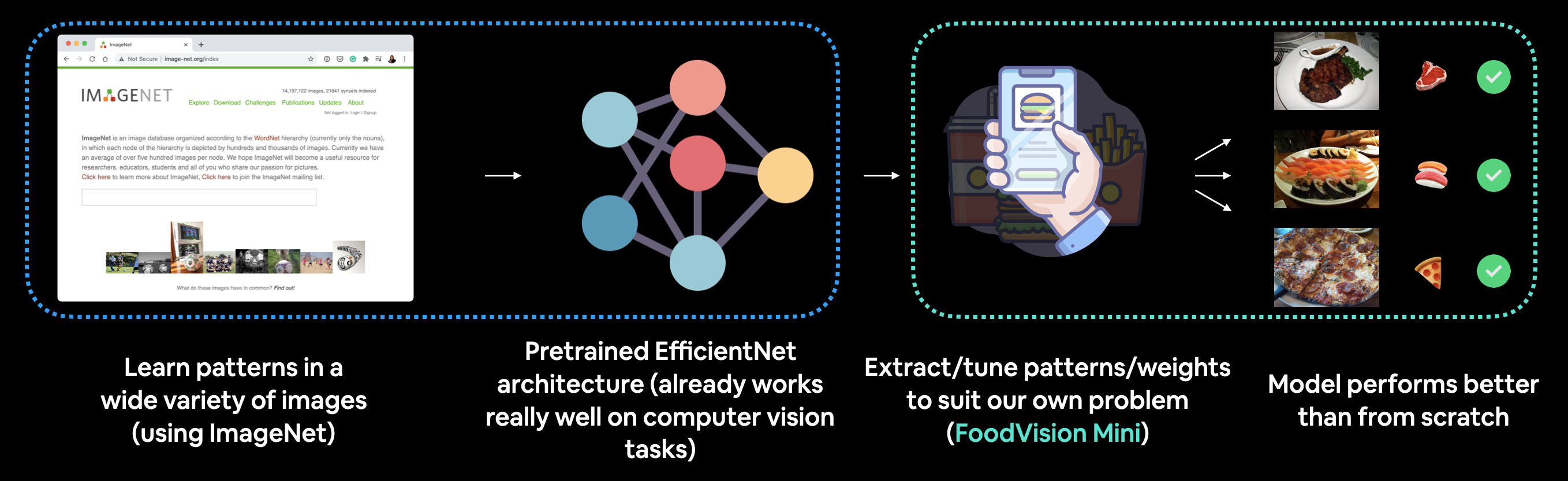
We'll be putting these to the test for our FoodVision Mini problem, we'll take a computer vision model pretrained on ImageNet and try to leverage its underlying learned representations for classifying images of pizza, steak and sushi.
Both research and practice support the use of transfer learning too.
A finding from a recent machine learning research paper recommended practioner's use transfer learning wherever possible.

A study into the effects of whether training from scratch or using transfer learning was better from a practioner's point of view, found transfer learning to be far more beneficial in terms of cost and time. Source: How to train your ViT? Data, Augmentation, and Regularization in Vision Transformers paper section 6 (conclusion).
And Jeremy Howard (founder of fastai) is a big proponent of transfer learning.
The things that really make a difference (transfer learning), if we can do better at transfer learning, it’s this world changing thing. Suddenly lots more people can do world-class work with less resources and less data. — Jeremy Howard on the Lex Fridman Podcast
Where to find pretrained models
The world of deep learning is an amazing place.
So amazing that many people around the world share their work.
Often, code and pretrained models for the latest state-of-the-art research is released within a few days of publishing.
And there are several places you can find pretrained models to use for your own problems.
| Location | What's there? | Link(s) |
|---|---|---|
| PyTorch domain libraries | Each of the PyTorch domain libraries (torchvision, torchtext) come with pretrained models of some form. The models there work right within PyTorch. |
torchvision.models, torchtext.models, torchaudio.models, torchrec.models |
| HuggingFace Hub | A series of pretrained models on many different domains (vision, text, audio and more) from organizations around the world. There's plenty of different datasets too. | https://huggingface.co/models, https://huggingface.co/datasets |
timm (PyTorch Image Models) library |
Almost all of the latest and greatest computer vision models in PyTorch code as well as plenty of other helpful computer vision features. | https://github.com/rwightman/pytorch-image-models |
| Paperswithcode | A collection of the latest state-of-the-art machine learning papers with code implementations attached. You can also find benchmarks here of model performance on different tasks. | https://paperswithcode.com/ |

With access to such high-quality resources as above, it should be common practice at the start of every deep learning problem you take on to ask, "Does a pretrained model exist for my problem?"
Exercise: Spend 5-minutes going through
torchvision.modelsas well as the HuggingFace Hub Models page, what do you find? (there's no right answers here, it's just to practice exploring)
# # Nightly versions of torch and torchvision required
# !pip3 install -U --pre torch torchvision torchaudio --extra-index-url https://download.pytorch.org/whl/nightly/cu113# Check versions of torch and torchvision
import torch
import torchvision
print(f"torch version: {torch.__version__} (should be 0.12+)")
print(f"torchvision version: {torchvision.__version__} (should be 0.13+)")torch version: 1.13.0.dev20220606 (should be 0.12+) torchvision version: 0.14.0.dev20220606 (should be 0.13+)
import matplotlib.pyplot as plt
import torch
import torchvision

from torch import nn
from torchvision import transforms

# Try to get torchinfo, install it if it doesn't work
try:
    from torchinfo import summary
except:
    print("[INFO] Couldn't find torchinfo... installing it.")
    !pip install -q torchinfo
    from torchinfo import summary

# Try to import the going_modular directory, download it from GitHub if it doesn't work
try:
    from going_modular.going_modular import data_setup, engine
except:
    # Get the going_modular scripts
    print("[INFO] Couldn't find going_modular scripts... downloading them from GitHub.")
    !git clone https://github.com/mrdbourke/pytorch-deep-learning
    !mv pytorch-deep-learning/going_modular .
    !rm -rf pytorch-deep-learning
from going_modular.going_modular import data_setup, engine# Setup device agnostic code
device = "cuda" if torch.cuda.is_available() else "cpu"
device'cuda'
import os
import zipfile

from pathlib import Path

import requests

# Setup path to data folder
data_path = Path("data/")
image_path = data_path / "pizza_steak_sushi"

# If the image folder doesn't exist, download it and prepare it...
if image_path.is_dir():
    print(f"{image_path} directory exists.")
else:
    print(f"Did not find {image_path} directory, creating one...")
    image_path.mkdir(parents=True, exist_ok=True)

    # Download pizza, steak, sushi data
    with open(data_path / "pizza_steak_sushi.zip", "wb") as f:
        request = requests.get("https://github.com/mrdbourke/pytorch-deep-learning/raw/main/data/pizza_steak_sushi.zip")
        print("Downloading pizza, steak, sushi data...")
        f.write(request.content)

    # Unzip pizza, steak, sushi data
    with zipfile.ZipFile(data_path / "pizza_steak_sushi.zip", "r") as zip_ref:
        print("Unzipping pizza, steak, sushi data...")
        zip_ref.extractall(image_path)

    # Remove .zip file
    os.remove(data_path / "pizza_steak_sushi.zip")
data/pizza_steak_sushi directory exists.
# Setup Dirs
train_dir = image_path / "train"
test_dir = image_path / "test"# Create a transforms pipeline manually (required for torchvision < 0.13)
manual_transforms = transforms.Compose([
transforms.Resize((224, 224)), # 1. Reshape all images to 224x224 (though some models may require different sizes)
transforms.ToTensor(), # 2. Turn image values to between 0 & 1
transforms.Normalize(mean=[0.485, 0.456, 0.406], # 3. A mean of [0.485, 0.456, 0.406] (across each colour channel)
std=[0.229, 0.224, 0.225]) # 4. A standard deviation of [0.229, 0.224, 0.225] (across each colour channel),
])# Create training and testing DataLoaders as well as get a list of class names
train_dataloader, test_dataloader, class_names = data_setup.create_dataloaders(train_dir=train_dir,
test_dir=test_dir,
transform=manual_transforms, # resize, convert images to between 0 & 1 and normalize them
batch_size=32) # set mini-batch size to 32
train_dataloader, test_dataloader, class_names(<torch.utils.data.dataloader.DataLoader at 0x7f4b80b11fc0>, <torch.utils.data.dataloader.DataLoader at 0x7f4b80b13d60>, ['pizza', 'steak', 'sushi'])
# Get a set of pretrained model weights
weights = torchvision.models.EfficientNet_B0_Weights.DEFAULT # .DEFAULT = best available weights from pretraining on ImageNet
weightsEfficientNet_B0_Weights.IMAGENET1K_V1
# Get the transforms used to create our pretrained weights
auto_transforms = weights.transforms()
auto_transformsImageClassification(
crop_size=[224]
resize_size=[256]
mean=[0.485, 0.456, 0.406]
std=[0.229, 0.224, 0.225]
interpolation=InterpolationMode.BICUBIC
)# Create training and testing DataLoaders as well as get a list of class names
train_dataloader, test_dataloader, class_names = data_setup.create_dataloaders(train_dir=train_dir,
test_dir=test_dir,
transform=auto_transforms, # perform same data transforms on our own data as the pretrained model
batch_size=32) # set mini-batch size to 32
train_dataloader, test_dataloader, class_names(<torch.utils.data.dataloader.DataLoader at 0x7f4b80ff8580>, <torch.utils.data.dataloader.DataLoader at 0x7f4b80ff9f30>, ['pizza', 'steak', 'sushi'])
3.2 Setting up a pretrained model
The pretrained model we're going to be using is torchvision.models.efficientnet_b0().
The architecture is from the paper EfficientNet: Rethinking Model Scaling for Convolutional Neural Networks.
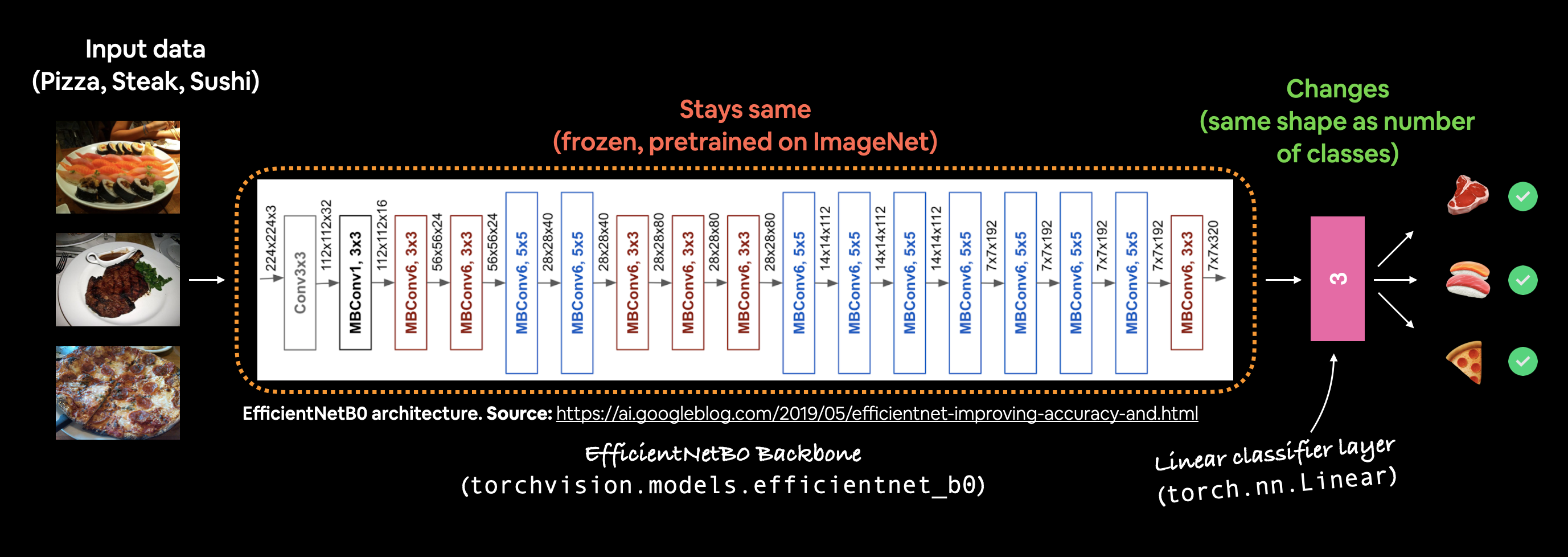
Example of what we're going to create, a pretrained EfficientNet_B0 model from torchvision.models with the output layer adjusted for our use case of classifying pizza, steak and sushi images.
We can setup the EfficientNet_B0 pretrained ImageNet weights using the same code as we used to create the transforms.
weights = torchvision.models.EfficientNet_B0_Weights.DEFAULT # .DEFAULT = best available weights for ImageNet
This means the model has already been trained on millions of images and has a good base representation of image data.
The PyTorch version of this pretrained model is capable of achieving ~77.7% accuracy across ImageNet's 1000 classes.
We'll also send it to the target device.
# OLD: Setup the model with pretrained weights and send it to the target device (this was prior to torchvision v0.13)
# model = torchvision.models.efficientnet_b0(pretrained=True).to(device) # OLD method (with pretrained=True)

# NEW: Setup the model with pretrained weights and send it to the target device (torchvision v0.13+)
weights = torchvision.models.EfficientNet_B0_Weights.DEFAULT # .DEFAULT = best available weights
model = torchvision.models.efficientnet_b0(weights=weights).to(device)

#model # uncomment to output (it's very long)If we print the model, we get something similar to the following:
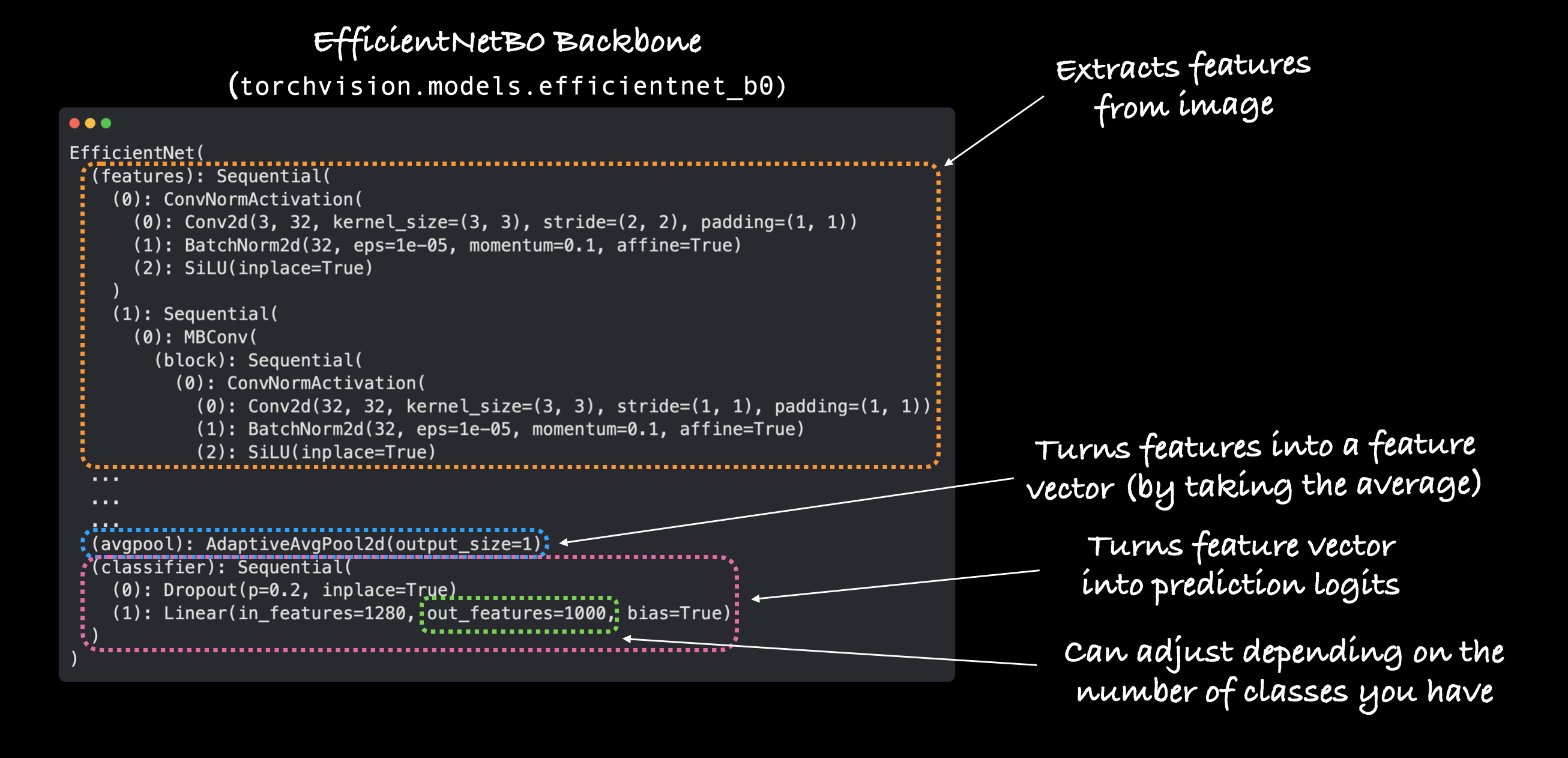
Lots and lots and lots of layers.
This is one of the benefits of transfer learning, taking an existing model, that's been crafted by some of the best engineers in the world and applying to your own problem.
Our efficientnet_b0 comes in three main parts:
features- A collection of convolutional layers and other various activation layers to learn a base representation of vision data (this base representation/collection of layers is often referred to as features or feature extractor, "the base layers of the model learn the different features of images").avgpool- Takes the average of the output of thefeatureslayer(s) and turns it into a feature vector.classifier- Turns the feature vector into a vector with the same dimensionality as the number of required output classes (sinceefficientnet_b0is pretrained on ImageNet and because ImageNet has 1000 classes,out_features=1000is the default).
# Print a summary using torchinfo (uncomment for actual output)
summary(model=model,
        input_size=(32, 3, 224, 224), # make sure this is "input_size", not "input_shape"
        # col_names=["input_size"], # uncomment for smaller output
        col_names=["input_size", "output_size", "num_params", "trainable"],
        col_width=20,
        row_settings=["var_names"]
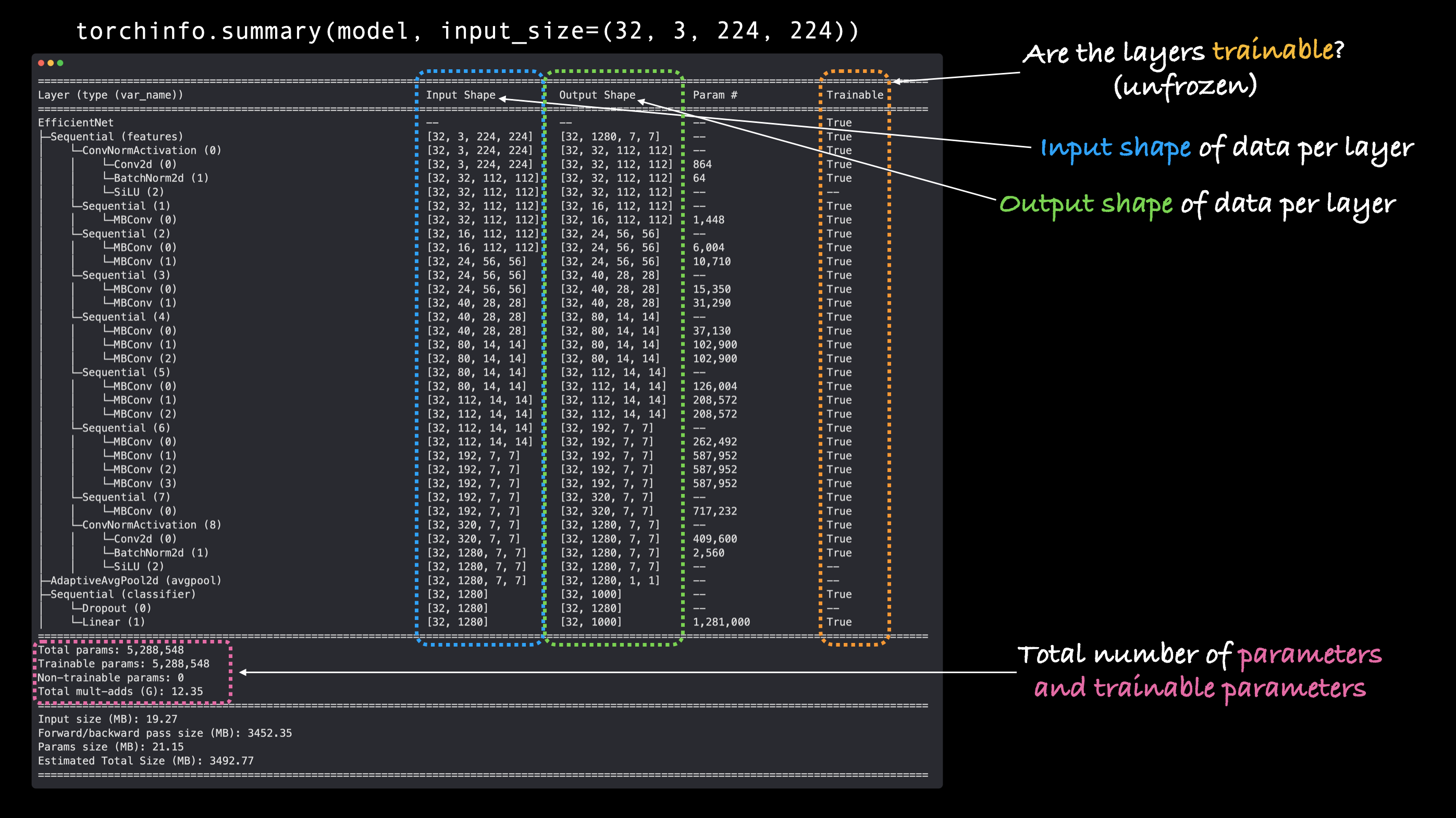
) ============================================================================================================================================ Layer (type (var_name)) Input Shape Output Shape Param # Trainable ============================================================================================================================================ EfficientNet (EfficientNet) [32, 3, 224, 224] [32, 1000] -- True ├─Sequential (features) [32, 3, 224, 224] [32, 1280, 7, 7] -- True │ └─Conv2dNormActivation (0) [32, 3, 224, 224] [32, 32, 112, 112] -- True │ │ └─Conv2d (0) [32, 3, 224, 224] [32, 32, 112, 112] 864 True │ │ └─BatchNorm2d (1) [32, 32, 112, 112] [32, 32, 112, 112] 64 True │ │ └─SiLU (2) [32, 32, 112, 112] [32, 32, 112, 112] -- -- │ └─Sequential (1) [32, 32, 112, 112] [32, 16, 112, 112] -- True │ │ └─MBConv (0) [32, 32, 112, 112] [32, 16, 112, 112] 1,448 True │ └─Sequential (2) [32, 16, 112, 112] [32, 24, 56, 56] -- True │ │ └─MBConv (0) [32, 16, 112, 112] [32, 24, 56, 56] 6,004 True │ │ └─MBConv (1) [32, 24, 56, 56] [32, 24, 56, 56] 10,710 True │ └─Sequential (3) [32, 24, 56, 56] [32, 40, 28, 28] -- True │ │ └─MBConv (0) [32, 24, 56, 56] [32, 40, 28, 28] 15,350 True │ │ └─MBConv (1) [32, 40, 28, 28] [32, 40, 28, 28] 31,290 True │ └─Sequential (4) [32, 40, 28, 28] [32, 80, 14, 14] -- True │ │ └─MBConv (0) [32, 40, 28, 28] [32, 80, 14, 14] 37,130 True │ │ └─MBConv (1) [32, 80, 14, 14] [32, 80, 14, 14] 102,900 True │ │ └─MBConv (2) [32, 80, 14, 14] [32, 80, 14, 14] 102,900 True │ └─Sequential (5) [32, 80, 14, 14] [32, 112, 14, 14] -- True │ │ └─MBConv (0) [32, 80, 14, 14] [32, 112, 14, 14] 126,004 True │ │ └─MBConv (1) [32, 112, 14, 14] [32, 112, 14, 14] 208,572 True │ │ └─MBConv (2) [32, 112, 14, 14] [32, 112, 14, 14] 208,572 True │ └─Sequential (6) [32, 112, 14, 14] [32, 192, 7, 7] -- True │ │ └─MBConv (0) [32, 112, 14, 14] [32, 192, 7, 7] 262,492 True │ │ └─MBConv (1) [32, 192, 7, 7] [32, 192, 7, 7] 587,952 True │ │ └─MBConv (2) [32, 192, 7, 7] [32, 192, 7, 7] 587,952 True │ │ └─MBConv (3) [32, 192, 7, 7] [32, 192, 7, 7] 587,952 True │ └─Sequential (7) [32, 192, 7, 7] [32, 320, 7, 7] -- True │ │ └─MBConv (0) [32, 192, 7, 7] [32, 320, 7, 7] 717,232 True │ └─Conv2dNormActivation (8) [32, 320, 7, 7] [32, 1280, 7, 7] -- True │ │ └─Conv2d (0) [32, 320, 7, 7] [32, 1280, 7, 7] 409,600 True │ │ └─BatchNorm2d (1) [32, 1280, 7, 7] [32, 1280, 7, 7] 2,560 True │ │ └─SiLU (2) [32, 1280, 7, 7] [32, 1280, 7, 7] -- -- ├─AdaptiveAvgPool2d (avgpool) [32, 1280, 7, 7] [32, 1280, 1, 1] -- -- ├─Sequential (classifier) [32, 1280] [32, 1000] -- True │ └─Dropout (0) [32, 1280] [32, 1280] -- -- │ └─Linear (1) [32, 1280] [32, 1000] 1,281,000 True ============================================================================================================================================ Total params: 5,288,548 Trainable params: 5,288,548 Non-trainable params: 0 Total mult-adds (G): 12.35 ============================================================================================================================================ Input size (MB): 19.27 Forward/backward pass size (MB): 3452.35 Params size (MB): 21.15 Estimated Total Size (MB): 3492.77 ============================================================================================================================================
Woah!
Now that's a big model!
From the output of the summary, we can see all of the various input and output shape changes as our image data goes through the model.
And there are a whole bunch more total parameters (pretrained weights) to recognize different patterns in our data.
For reference, our model from previous sections, TinyVGG had 8,083 parameters vs. 5,288,548 parameters for efficientnet_b0, an increase of ~654x!
What do you think, will this mean better performance?
3.4 Freezing the base model and changing the output layer to suit our needs
The process of transfer learning usually goes: freeze some base layers of a pretrained model (typically the features section) and then adjust the output layers (also called head/classifier layers) to suit your needs.
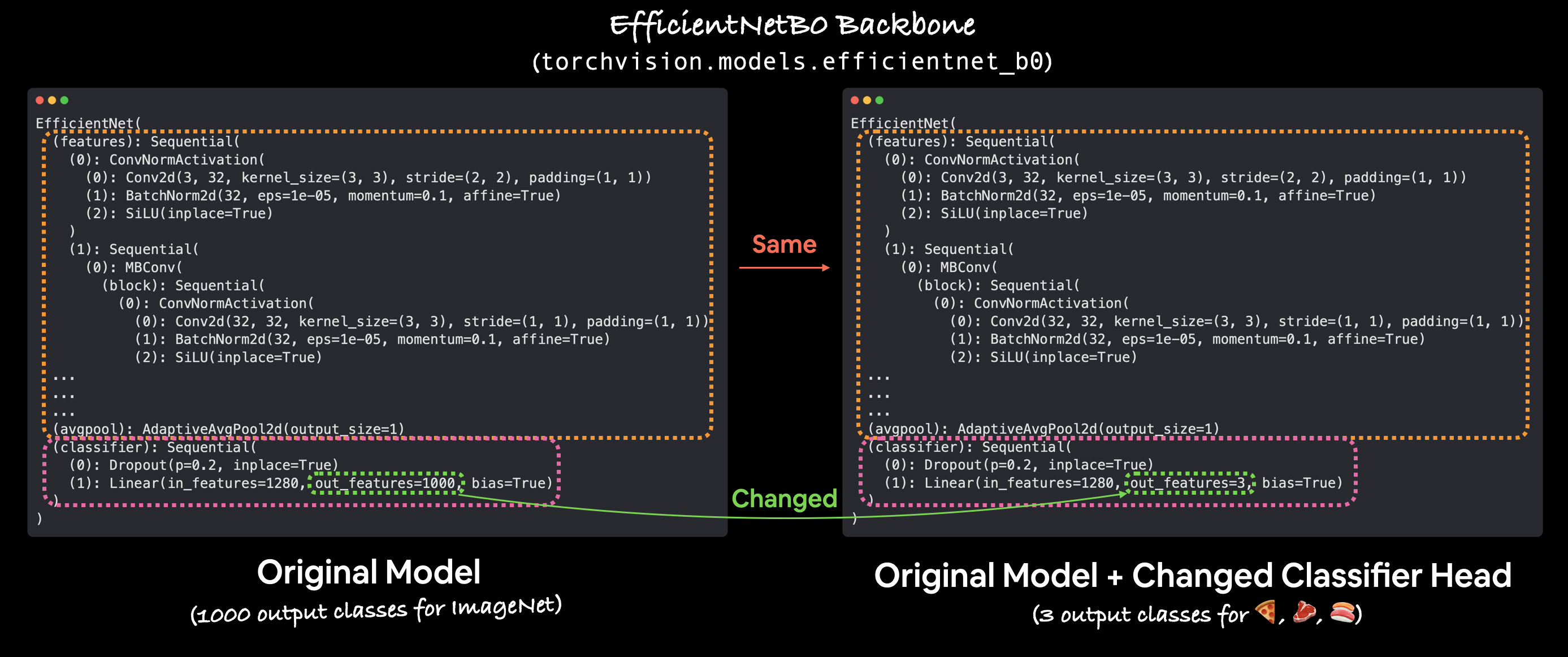
You can customise the outputs of a pretrained model by changing the output layer(s) to suit your problem. The original torchvision.models.efficientnet_b0() comes with out_features=1000 because there are 1000 classes in ImageNet, the dataset it was trained on. However, for our problem, classifying images of pizza, steak and sushi we only need out_features=3.
Let's freeze all of the layers/parameters in the features section of our efficientnet_b0 model.
Note: To freeze layers means to keep them how they are during training. For example, if your model has pretrained layers, to freeze them would be to say, "don't change any of the patterns in these layers during training, keep them how they are." In essence, we'd like to keep the pretrained weights/patterns our model has learned from ImageNet as a backbone and then only change the output layers.
We can freeze all of the layers/parameters in the features section by setting the attribute requires_grad=False.
For parameters with requires_grad=False, PyTorch doesn't track gradient updates and in turn, these parameters won't be changed by our optimizer during training.
In essence, a parameter with requires_grad=False is "untrainable" or "frozen" in place.
# Freeze all base layers in the "features" section of the model (the feature extractor) by setting requires_grad=False
for param in model.features.parameters():
param.requires_grad = False# Set the manual seeds
torch.manual_seed(42)
torch.cuda.manual_seed(42)
# Get the length of class_names (one output unit for each class)
output_shape = len(class_names)
# Recreate the classifier layer and seed it to the target device
model.classifier = torch.nn.Sequential(
torch.nn.Dropout(p=0.2, inplace=True),
torch.nn.Linear(in_features=1280,
out_features=output_shape, # same number of output units as our number of classes
bias=True)).to(device)# # Do a summary *after* freezing the features and changing the output classifier layer (uncomment for actual output)
summary(model,
input_size=(32, 3, 224, 224), # make sure this is "input_size", not "input_shape" (batch_size, color_channels, height, width)
verbose=0,
col_names=["input_size", "output_size", "num_params", "trainable"],
col_width=20,
row_settings=["var_names"]
)============================================================================================================================================ Layer (type (var_name)) Input Shape Output Shape Param # Trainable ============================================================================================================================================ EfficientNet (EfficientNet) [32, 3, 224, 224] [32, 3] -- Partial ├─Sequential (features) [32, 3, 224, 224] [32, 1280, 7, 7] -- False │ └─Conv2dNormActivation (0) [32, 3, 224, 224] [32, 32, 112, 112] -- False │ │ └─Conv2d (0) [32, 3, 224, 224] [32, 32, 112, 112] (864) False │ │ └─BatchNorm2d (1) [32, 32, 112, 112] [32, 32, 112, 112] (64) False │ │ └─SiLU (2) [32, 32, 112, 112] [32, 32, 112, 112] -- -- │ └─Sequential (1) [32, 32, 112, 112] [32, 16, 112, 112] -- False │ │ └─MBConv (0) [32, 32, 112, 112] [32, 16, 112, 112] (1,448) False │ └─Sequential (2) [32, 16, 112, 112] [32, 24, 56, 56] -- False │ │ └─MBConv (0) [32, 16, 112, 112] [32, 24, 56, 56] (6,004) False │ │ └─MBConv (1) [32, 24, 56, 56] [32, 24, 56, 56] (10,710) False │ └─Sequential (3) [32, 24, 56, 56] [32, 40, 28, 28] -- False │ │ └─MBConv (0) [32, 24, 56, 56] [32, 40, 28, 28] (15,350) False │ │ └─MBConv (1) [32, 40, 28, 28] [32, 40, 28, 28] (31,290) False │ └─Sequential (4) [32, 40, 28, 28] [32, 80, 14, 14] -- False │ │ └─MBConv (0) [32, 40, 28, 28] [32, 80, 14, 14] (37,130) False │ │ └─MBConv (1) [32, 80, 14, 14] [32, 80, 14, 14] (102,900) False │ │ └─MBConv (2) [32, 80, 14, 14] [32, 80, 14, 14] (102,900) False │ └─Sequential (5) [32, 80, 14, 14] [32, 112, 14, 14] -- False │ │ └─MBConv (0) [32, 80, 14, 14] [32, 112, 14, 14] (126,004) False │ │ └─MBConv (1) [32, 112, 14, 14] [32, 112, 14, 14] (208,572) False │ │ └─MBConv (2) [32, 112, 14, 14] [32, 112, 14, 14] (208,572) False │ └─Sequential (6) [32, 112, 14, 14] [32, 192, 7, 7] -- False │ │ └─MBConv (0) [32, 112, 14, 14] [32, 192, 7, 7] (262,492) False │ │ └─MBConv (1) [32, 192, 7, 7] [32, 192, 7, 7] (587,952) False │ │ └─MBConv (2) [32, 192, 7, 7] [32, 192, 7, 7] (587,952) False │ │ └─MBConv (3) [32, 192, 7, 7] [32, 192, 7, 7] (587,952) False │ └─Sequential (7) [32, 192, 7, 7] [32, 320, 7, 7] -- False │ │ └─MBConv (0) [32, 192, 7, 7] [32, 320, 7, 7] (717,232) False │ └─Conv2dNormActivation (8) [32, 320, 7, 7] [32, 1280, 7, 7] -- False │ │ └─Conv2d (0) [32, 320, 7, 7] [32, 1280, 7, 7] (409,600) False │ │ └─BatchNorm2d (1) [32, 1280, 7, 7] [32, 1280, 7, 7] (2,560) False │ │ └─SiLU (2) [32, 1280, 7, 7] [32, 1280, 7, 7] -- -- ├─AdaptiveAvgPool2d (avgpool) [32, 1280, 7, 7] [32, 1280, 1, 1] -- -- ├─Sequential (classifier) [32, 1280] [32, 3] -- True │ └─Dropout (0) [32, 1280] [32, 1280] -- -- │ └─Linear (1) [32, 1280] [32, 3] 3,843 True ============================================================================================================================================ Total params: 4,011,391 Trainable params: 3,843 Non-trainable params: 4,007,548 Total mult-adds (G): 12.31 ============================================================================================================================================ Input size (MB): 19.27 Forward/backward pass size (MB): 3452.09 Params size (MB): 16.05 Estimated Total Size (MB): 3487.41 ============================================================================================================================================
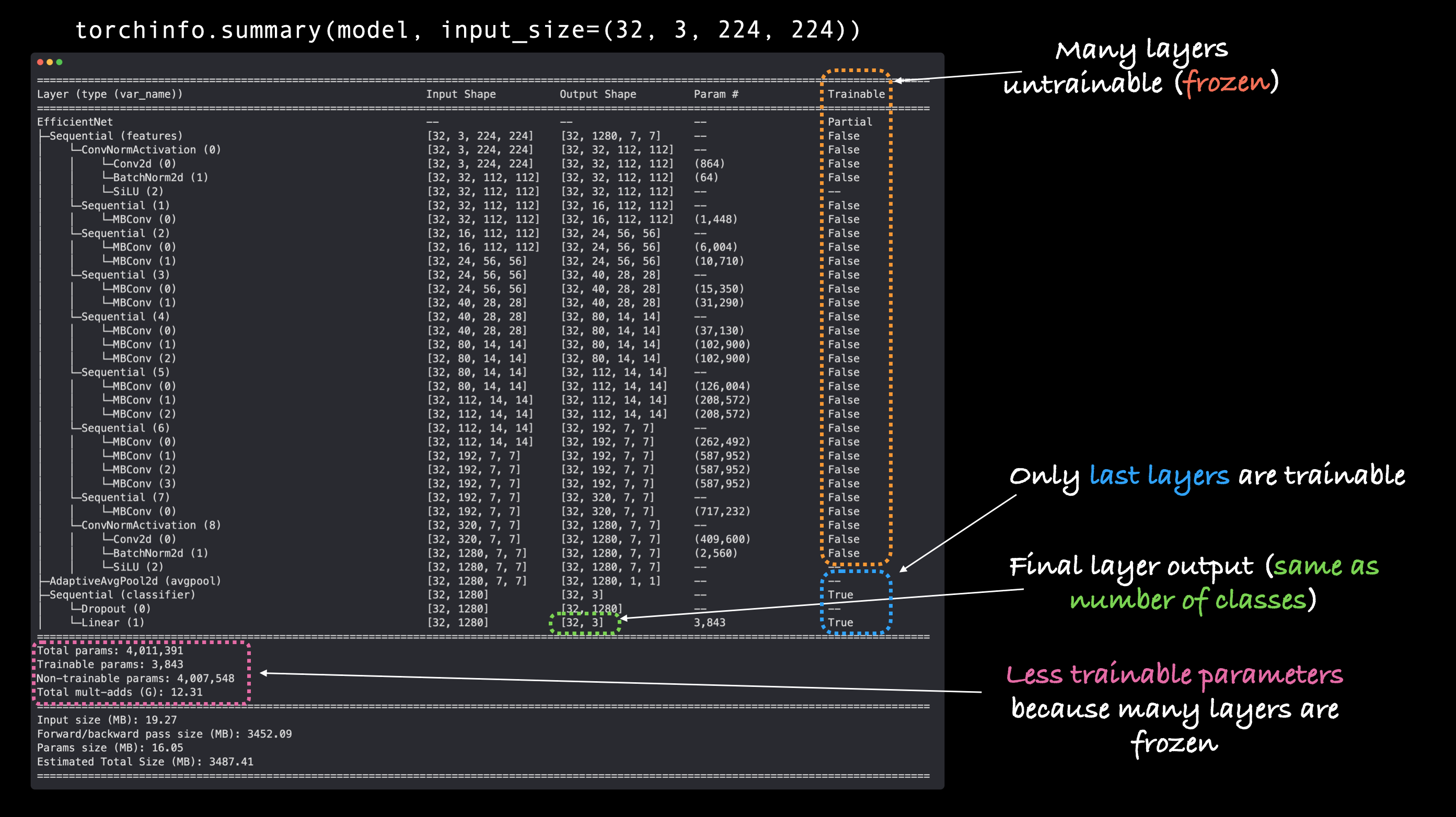
Ho, ho! There's a fair few changes here!
Let's go through them:
- Trainable column - You'll see that many of the base layers (the ones in the
featuresportion) have their Trainable value asFalse. This is because we set their attributerequires_grad=False. Unless we change this, these layers won't be updated during furture training. - Output shape of
classifier- Theclassifierportion of the model now has an Output Shape value of[32, 3]instead of[32, 1000]. It's Trainable value is alsoTrue. This means its parameters will be updated during training. In essence, we're using thefeaturesportion to feed ourclassifierportion a base representation of an image and then ourclassifierlayer is going to learn how to base representation aligns with our problem. - Less trainable parameters - Previously there was 5,288,548 trainable parameters. But since we froze many of the layers of the model and only left the
classifieras trainable, there's now only 3,843 trainable parameters (even less than our TinyVGG model). Though there's also 4,007,548 non-trainable parameters, these will create a base representation of our input images to feed into ourclassifierlayer.
Note: The more trainable parameters a model has, the more compute power/longer it takes to train. Freezing the base layers of our model and leaving it with less trainable parameters means our model should train quite quickly. This is one huge benefit of transfer learning, taking the already learned parameters of a model trained on a problem similar to yours and only tweaking the outputs slightly to suit your problem.
# Define loss and optimizer
loss_fn = nn.CrossEntropyLoss()
optimizer = torch.optim.Adam(model.parameters(), lr=0.001)# Set the random seeds
torch.manual_seed(42)
torch.cuda.manual_seed(42)
# Start the timer
from timeit import default_timer as timer
start_time = timer()
# Setup training and save the results
results = engine.train(model=model,
train_dataloader=train_dataloader,
test_dataloader=test_dataloader,
optimizer=optimizer,
loss_fn=loss_fn,
epochs=5,
device=device)
# End the timer and print out how long it took
end_time = timer()
print(f"[INFO] Total training time: {end_time-start_time:.3f} seconds")0%| | 0/5 [00:00<?, ?it/s]
Epoch: 1 | train_loss: 1.0929 | train_acc: 0.4023 | test_loss: 0.9125 | test_acc: 0.5502
Epoch: 2 | train_loss: 0.8703 | train_acc: 0.7773 | test_loss: 0.7900 | test_acc: 0.8153
Epoch: 3 | train_loss: 0.7648 | train_acc: 0.8008 | test_loss: 0.7433 | test_acc: 0.8561
Epoch: 4 | train_loss: 0.7114 | train_acc: 0.7578 | test_loss: 0.6344 | test_acc: 0.8655
Epoch: 5 | train_loss: 0.6252 | train_acc: 0.7930 | test_loss: 0.6238 | test_acc: 0.8864
[INFO] Total training time: 5.977 seconds
# Get the plot_loss_curves() function from helper_functions.py, download the file if we don't have it
try:
    from helper_functions import plot_loss_curves
except:
    print("[INFO] Couldn't find helper_functions.py, downloading...")
    with open("helper_functions.py", "wb") as f:
        import requests
        request = requests.get("https://raw.githubusercontent.com/mrdbourke/pytorch-deep-learning/main/helper_functions.py")
        f.write(request.content)
    from helper_functions import plot_loss_curves

# Plot the loss curves of our model
plot_loss_curves(results)
from typing import List, Tuple

from PIL import Image

# 1. Take in a trained model, class names, image path, image size, a transform and target device
def pred_and_plot_image(model: torch.nn.Module,
                        image_path: str,
                        class_names: List[str],
                        image_size: Tuple[int, int] = (224, 224),
                        transform: torchvision.transforms = None,
                        device: torch.device=device):


    # 2. Open image
    img = Image.open(image_path)

    # 3. Create transformation for image (if one doesn't exist)
    if transform is not None:
        image_transform = transform
    else:
        image_transform = transforms.Compose([
            transforms.Resize(image_size),
            transforms.ToTensor(),
            transforms.Normalize(mean=[0.485, 0.456, 0.406],
                                 std=[0.229, 0.224, 0.225]),
        ])

    ### Predict on image ###

    # 4. Make sure the model is on the target device
    model.to(device)

    # 5. Turn on model evaluation mode and inference mode
    model.eval()
    with torch.inference_mode():
      # 6. Transform and add an extra dimension to image (model requires samples in [batch_size, color_channels, height, width])
      transformed_image = image_transform(img).unsqueeze(dim=0)

      # 7. Make a prediction on image with an extra dimension and send it to the target device
      target_image_pred = model(transformed_image.to(device))

    # 8. Convert logits -> prediction probabilities (using torch.softmax() for multi-class classification)
    target_image_pred_probs = torch.softmax(target_image_pred, dim=1)

    # 9. Convert prediction probabilities -> prediction labels
    target_image_pred_label = torch.argmax(target_image_pred_probs, dim=1)

    # 10. Plot image with predicted label and probability
    plt.figure()
    plt.imshow(img)
    plt.title(f"Pred: {class_names[target_image_pred_label]} | Prob: {target_image_pred_probs.max():.3f}")
plt.axis(False);# Get a random list of image paths from test set
import random
num_images_to_plot = 3
test_image_path_list = list(Path(test_dir).glob("*/*.jpg")) # get list all image paths from test data
test_image_path_sample = random.sample(population=test_image_path_list, # go through all of the test image paths
k=num_images_to_plot) # randomly select 'k' image paths to pred and plot
# Make predictions on and plot the images
for image_path in test_image_path_sample:
pred_and_plot_image(model=model,
image_path=image_path,
class_names=class_names,
# transform=weights.transforms(), # optionally pass in a specified transform from our pretrained model weights
image_size=(224, 224))


# Download custom image
import requests

# Setup custom image path
custom_image_path = data_path / "04-pizza-dad.jpeg"

# Download the image if it doesn't already exist
if not custom_image_path.is_file():
    with open(custom_image_path, "wb") as f:
        # When downloading from GitHub, need to use the "raw" file link
        request = requests.get("https://raw.githubusercontent.com/mrdbourke/pytorch-deep-learning/main/images/04-pizza-dad.jpeg")
        print(f"Downloading {custom_image_path}...")
        f.write(request.content)
else:
    print(f"{custom_image_path} already exists, skipping download.")

# Predict on custom image
pred_and_plot_image(model=model,
                    image_path=custom_image_path,
                    class_names=class_names)
data/04-pizza-dad.jpeg already exists, skipping download.
